The Galaxy Nexus (formerly referred to as the Nexus Prime) carries on the Nexus torch in spectacular fashion, and we've just spent a few quality moments with one here at the launch event. Design-wise, it's clear that the Nexus S DNA is here, though the rear reminds us most of the Galaxy S II. Those who abhor physical buttons will also be delighted, and while we'd gotten used to the whole Power + Home for a screenshot on the GSII, Power + Volume Down works just fine on this fellow.......
PSHax member - Google has taken the stage in Hong Kong to make the next version of Android OS, nicknamed Ice Cream Sandwich, a thing of reality. Better known as Android 4.0, the update offers a massive redesign to the user interface and adds a plethora of new features. Some of the highlights include an NFC-enabled feature called Android Beam, offline search in Gmail, new lock screen features and a fancy unlocking method called "Face Unlock," which uses facial recognition to ensure strangers can't use your phone without permission. Ice Cream Sandwich also includes enhancements in.....
Mutricy mentioned that while the company's new flagship device was designed for Gingerbread, plans have been set to introduce the latest version of Android in the start of 2012, with a more precise date naturally on its way. Given past experience, however, it's probable that the unbranded version of the device will get the refresh ahead of the Droid RAZR on Verizon, so US users may need to exercise a wee bit of patience here. Regardless, it's time for the competition to step up......
Hark! The first renders of the HTC Rezound have appeared online, thanks to some of the device's cases going up for pre-order. You can see that, like the Sensation XE, the phone has red-glowing soft keys -- a bit of a departure from HTC's traditionally conservative design language. If you recall, the phone formerly called Vigor is said to have a 4.3-inch screen, a dual-core 1.5GHz processor, 1GB RAM, Beats Audio and an 8MP rear camera.....
One of the big questions about Jolla's new Sailfish OS would be ecosystem. I mean it is hard enough to get the average consumer to switch OS's alone but, if you are missing their favorite apps you have no shot at all. So what did Jolla do to bridge this gap? They made their OS Android and MeeGo app compatible.
While I didn't see the entire Sailfish presentation there was a mention that Sailfish will not only be able to run the apps made for Nokia's N9 but also it should be able to run Android apps. This is a HUGE win for consumers it automatically puts an entire world of apps at their disposal from the get go.
This shouldn't come as much of a shock to the tech world as it was always rumored that he Nokia N9 could run Android apps if the right software was made. Sadly however this software never came and the N9 is stuck with the limited apps made for Nokia version of the MeeGo OS.
Knowing that Jolla's phones can now run a wide variety of apps does this make anyone take a second (or first) look at this new OS?
So what is the GT-B9150? It is a 5.3-inch sAMOLED HD Dual display device that runs Android and will likely officially be called the 'Samsung Galaxy Q'. The rumor mill suggest it will run on an EXYNOS 5250 processor and will have 2GB of RAM. Other specs are believed to be an 8MP back cam, a 2MP front cam, NFC, Wi-Fi, Bluetooth and a 3500mAh battery.
Asus Memo 370T believe to be a predessor of Nexus 7. With the same specs and design, it is a Nexus 7 plus HDMI, Bluetooth, microSD slot, rear 8MP camera etc. By now, you hopefully already know about the ASUS MeMO 370T. On paper, the MeMO 370T is a spec’d out 7-inch slate that features nVidia’s powerful Tegra 3 quad-core system on a chip. This tablet screams top-of-the-line, yet ASUS will offer the tablet to consumer for $250. Why would they price this thing so low, you ask
In short, ASUS simply gets it. They understand that consumers want tablets, perhaps to even replace their laptops, but they don’t want them at laptop prices. Instead, consumers largely see tablets as cooler netbooks, and are looking to spend between $200 and $400 on these devices. Of course, the $500 and up iPad/iPad2 have bucked this tradition, but Apple has a long history of pricing themselves at the very high end of the market (or above), and still selling a multitude of devices to their fanbase.
The biggest reason Android tablet sales haven’t taken off is because they’ve been priced to compete with iPads instead of netbooks. Amazon proved this when they launched the Kindle Fire, the $200 eReader tablet hybrid that in 2 months has sold as many or more units than all previous Android tablets combined. HP’s Touchpad tablets sold out in minutes when they were dropped to $100-150 in HP’s inventory eliminating fire-sale. The $250 Nook Tablet has proven no slouch either, making Barnes and Noble’s nook line one of their most profitable divisions.
In order for tablet makers (including Apple) to compete, they’re going to have to continue to offer tablets for less, a point ASUS has certainly taken to heart with the MeMO 370T. The launch of the MeMO 370T was likely the biggest and best surprise of CES 2012, and we’re happy to see companies starting to offer powerful tablets at incredibly affordable prices. We hope to see this trend continue; in fact, we think it has to continue if Android tablet sales are ever going to take off.
It was 10 months ago that we had a doppelgänger in our midst. Amazon unleashed the Kindle Fire to the world and we spent much of the beginning of our review comparing and contrasting it to the (even then a bit long-in-the-tooth) BlackBerry PlayBook. Now, it's the Kindle Fire HD and it quite handily addresses nearly every concern that we had with the original Fire. It's thinner, lighter, faster and, yes, better looking. It's a huge step forward from that which came before and yet it still follows very much in the footsteps of its predecessor, existing as a physical portal to a digital marketplace with an alluring selection of premium content. Is it enough of an improvement to topple our current king of budget tablets, the Nexus 7? You'll just have to read on to find out.
Hardware
To borrow a bit of cigarette marketing, the Kindle Fire HD has come a long way, baby. Where the Fire is square, dark and decidedly slab-like, the Fire HD is... well, it still isn't a knockout in the styling department, but it is at least considerably more visually appealing. The angular edges from before have been banished, replaced by a profile that curves up to meet a few millimeters worth of flat surface that then curves back again to meet the glass up top. That surface is indeed made of Corning's Gorilla Glass, so you can probably do without a protector, and it covers a 7-inch panel, the same size as before. (The 8.9-inch model won't arrive until later this year.)
The Kindle Fire HD measures in at 7.6 x 5.4 x 0.4 inches (193 x 137 x 10.3mm). That's slightly (3mm) wider, noticeably (17mm) taller and fractionally (1.1mm) thinner than the Fire. In other words, it occupies roughly the same dimensions, but the taper on the back surface does a compelling job of making this feel thinner. It's slightly lighter, too, weighing in at 395g (13.9oz) compared to the OG machine's 413g.
The overall design remains understated; visually, a sea of soft-touch matte black will be your overwhelming impression here. But, with that comes an air of sophistication. The Amazon logo is still subtly printed on the back, a dark shade of gray stamped atop the darker exterior. You may be visually assaulted by Amazon branding at every turn once you switch the device on, but the exterior at least is reasonably clean.
Across the back runs a slightly polished metal band, the lone bit of stylistic indulgence here. It spans the width of the tablet, running from one speaker to the other and, along the way, has the word "kindle" embossed. Yes, there are two speakers here, one for each of your ears in the natural way. Both are covered in a lined grille that makes us think of the radiator inlets on a Ferrari Testarossa, though that might be entirely due to the prevalence of said car on the walls of this author's childhood bedroom.
Take a tour around the edges of the device and you'll find a far more comprehensive selection of buttons and ports than in the original Fire, a big step forward that shows Amazon listens to criticism. This is a tablet clearly designed to be held in a landscape orientation when enjoying media, and held thusly, you'll find micro-USB and micro-HDMI ports on the bottom. The USB port is used for charging or file transfers, though you can also email files to your device (via the custom address each Kindle is assigned) or upload them through the Cloud Player service. The HDMI output is a very welcome addition and enables pushing all those high-def movie downloads straight to your HDTV, should you be so inclined.
The left side of the device has nothing to offer, while the top has a small microphone. On the right is found the 3.5mm headphone jack, positioned atop a volume rocker and power button. This physical volume control is also new compared to the Fire, which asked you to hop into the UI whenever you wanted to turn up the jams -- or the Audibles, as it were. This is far more convenient, but we found all the physical controls to be very hard to find by touch. The power button in particular is virtually intangible: tapered and flush. You'll need to flip the tablet around to find it for at least your first week of ownership. The volume rocker, at least, has two slight protrusions to set it apart.
Internals
There are two storage options for the 7-inch Kindle Fire HD: 16GB for $199 or 32GB for $249. Opt for the smaller and you'll have about 12.6GB of space at your disposal, while the larger offers 26.9GB. Otherwise the two are identical, both using a 1.2GHz dual-core TI OMAP4460 processor. Amazon doesn't quote the amount of RAM, but a system check shows 752MB.
There's no 3G / 4G option on the 7-inch Fire HD; you'll need to step up to the forthcoming 8.9-inch model for that -- and pay an extra $200, too. So, we're stuck with WiFi, but not just any WiFi. Jeff Bezos spent about five minutes of the Kindle Fire HD's coming out party to espouse the virtues of MIMO connectivity. That's multiple-input multiple-output if you're not hep with the lingo, basically meaning the tablet can both send and receive data simultaneously over its pair of antennas.
In theory, if you're sending and receiving a lot of data this means you'll receive better overall throughput. The dual antennas will also mean higher overall signal strength, and compared to a few other Android devices we had kicking about (a Nexus 7 and a Motorola Droid RAZR M), the Kindle Fire HD was easily the best of the bunch. We loaded up the Wifi Analyzer app on all three and the Kindle consistently had a 10 to 15dBm stronger signal, and was able to keep that signal farther away from the router than either of the other two.
Display and speakers
If you hadn't guessed by the name, the Kindle Fire HD takes the tablet series into the world of high-definition. It's a 1,280 x 800 IPS LCD that, like its sadly lower-res predecessor, offers solid brightness and contrast mixed with wide viewing angles. It looks very good indeed and, with greater-than-720p resolution, can finally do all that HD content in the Amazon store justice. That said, with that HDMI output you also can push that content digitally to whatever other display you want.
The HD also steps up to stereo speakers and Amazon is making a big deal about this being one of the few (if not the only) tablets offering Dolby Digital Plus. In theory that means better and broader support for digital compression algorithms, as well as other fun and largely useless stuff like virtual surround sound. We'll let you, the reader, decide how important virtual surround is to your listening enjoyment, but overall we didn't find the speakers themselves to be particularly impressive in terms of their acoustic delivery.
In fact their sound is distinctly on the tinny side, as one might expect given the size, but they are respectably loud and, frankly, it's a refreshing change to have two of the things. Here they're well-positioned so that you get maximum stereo separation when watching a movie or playing a game and we found that they work well even when covered by your hands. That, too, isn't something that can be said for the sound ports on other slabs.
Performance and battery life
The Kindle Fire HD may only get a 200MHz boost in performance over the Kindle Fire that came before it, but it feels considerably quicker than that. The media-focused UI customization that the previous tablet couldn't really handle is far more responsive now. That main carousel of content and apps and websites that is the trademark of the Fire series no longer has fits and stops and stutters -- but there are still some sluggish moments, particularly when reading comic books. We spent a fair bit of time admiring Frank Miller's "Batman: The Dark Knight Returns" and couldn't help noticing the uneven rate with which the pages turn. But that didn't stop us from being glad we have access to such a wide swath of the DC back catalog.
Web pages load quickly, the latest version of the remote-rendering Silk browser beginning to live up to its name, but it still doesn't beat a standard browser in either initial rendering time or fluidity of pinch-zooming. The Chrome browser on the Nexus 7 rendered every page we threw at it faster than the Fire HD, all without relying on any fancy off-site rendering techniques. Of course, the purported beauty of Silk is that it'll just get faster the more people that use it, but we never quite saw that come to pass with the last version, and we don't have particularly high hopes about this one picking up in speed.
As with the last Fire, we didn't have much luck running specific Android benchmarks, but the SunSpider JavaScript browser test gave us an average score of 1,767ms. That's nearly 700ms faster than the previous Fire and almost identical to the Nexus 7's 1,785ms.
When it comes to battery life Amazon says you can expect 11 hours of normal usage, and in our typical battery rundown test (with a looping video, WiFi on and the display set to a fixed brightness) we scored about an hour short of that. Nine hours and 57 minutes, to be exact -- eight minutes more than the Nexus 7 managed on the same test. Yet again, a near-identical score and well within the top-tier of tablets.
Software
Much of the appeal -- or the annoyance, depending on your perspective -- of the Kindle Fire series comes with its heavily content-focused user interface sitting atop Android. This time around it's Android 4.0 Ice Cream Sandwich that's been given the treatment and, in general, things are much improved for it.
Interface
The Kindle Fire HD is still built around the main carousel of content that was introduced with the Fire. It's largely unchanged but, thankfully, so much smoother than before. That carousel offers one-stop access to all your books, music, movies, apps and even websites, all presented in LIFO (last in, first out) order so your most recent selections are right there at the top.
Beneath the main cycle of icons is another sequence of smaller ones that changes dynamically based on what is highlighted above. Hover over an app and it will offer a selection of apps that "Customers Also Bought." Stop at a certain book and it will show you some other novels that people have also bought. The same can be said for movies, music albums, even magazines. Finally, at the very bottom of the screen can be found a few rows of small text. Look closely and you'll that this too is an advertisement.
If you're looking to buy something but don't know what, the Kindle Fire HD would love to help.
Reading
The basic reading interface is largely unchanged from what we've seen before, which is just fine by us -- ain't broke, don't fix it and whatnot. A swipe or a tap takes you from page to page and there are plenty of options for changing font (still just six), color (black on white, brown on sepia or white on black) and margins. Taking notes is as easy as dragging a finger across text and sharing anything to Twitter or Facebook is similarly simple. Just figured out who the murderer is? Feel free to issue a tweet right from that climactic page and spoil the book for all your friends.
The big addition here is Amazon's Immersion Reading service. Now, when you purchase a textual book that's also offered in Audible format you'll be given the option of adding the voice narration for a few bucks more. When these two mediums combine you can play the narration while you read the text and the word being spoken will be highlighted on the tablet as it's said.
This is an experience that's said to increase reading comprehension, but more importantly, it means you can pick up right where you left off -- whether you left off listening in the car or reading in bed. That's thanks to Whispersync for Voice, which is currently rolling out to Audible's various mobile apps. With that you can listen on any supported device and have your current position follow you wherever you are. We tried this with the recently updated Android app and it worked perfectly, dropping us into the book right where the Audible recording left off.
Productivity
Amazon includes OfficeSuite for opening your average Office-type productivity applications, which again you can email right to your Kindle if you like. There are also new email, calendar and contacts apps that deliver a fair bit more usability than with the previous Fire. We plugged in a Gmail account and the tablet quickly sucked down our recent email, with labels, and within a minute or so we were fighting the good fight of the inbox bulge anew.
The calendar and contacts apps are similarly workable, but serious productivity-hounds will find them somewhat lightweight. For example, you can't tap on an address in a calendar invite to get directions there, can't view calendars shared with you in Gmail and, should you forget to enter an event without a name, it just says "Cannot create an empty event" and discards all of your changes. You do, at least, get reminder notifications pushed into the status bar to alert you of your upcoming conference call.
Accessories
We also received Amazon's leather case for the Kindle, which costs $44.99 and handily consumes your tablet on all sides. It's is available in a variety of mostly tame colors, the exception being the still somewhat subdued yellow we received. It provides easy access to all ports and buttons, cut-outs for the speakers and, best of all, has a magnetic flap that locks the screen when you close it.
Amazon also offers a $19.99 ($9.99 if you buy it with a Kindle) charging adapter for the thing, as you'll get only the micro-USB cable in the box. Yes, you can charge it up through any standard USB charger, but you'll need a higher-spec charger like this one (or any of the dozens of iPad chargers) to do so at maximum speed -- about four hours from empty to full by Amazon's reckoning.
And then there's the best accessory of all: $15 to turn off Offers. Amazon hasn't enabled this feature yet so we weren't able to try it ourselves, but given the prevalence of advertising beating you over the head everywhere you look in this thing, it might just be worth it.
The competition
When the original Kindle Fire launched, there wasn't an awful lot to compare it to. After all, 7-inch tablets were rare and those priced at $200 were largely, well, junk. That's certainly changed, but the most direct competition for the Kindle Fire HD is its predecessor, now informally called the Kindle Fire SD. It's largely the same device as before, still rocking the PlayBook-esque exterior and limping along with just 8GB of storage, but it now features a similar 1.2GHz processor as that found in the HD. And, it's considerably cheaper at $159.
For that $40 here you get twice the storage and a lot more pixels to gaze at, which we think is well worth the increase in cost. But, honestly, if you're swaying well to the casual side and will be doing some simple gaming, surfing and reading -- maybe looking at a tablet for a child -- the Kindle Fire SD is a really good value.
If, on the other hand, you're someone who is leaning more toward the power user side, you're probably wondering how this stacks up against the $199 Google Nexus 7. When we reviewed that, we called it the best $200 tablet you can buy and now, a few months later, we still think that's true. But it's close. Really close. For the same money the Fire HD gives you twice the storage, proper stereo speakers, HDMI output and better WiFi performance. Plus, there's an amazing wealth of premium content always at your fingertips -- you'll never want for something to watch, read or listen to.
But, we'd still take the Nexus 7. All that content can't make up for the distinctly limited offerings in Amazon's Appstore, most notably the first-party Google apps. Gmail and Google Maps alone add significant value to the Nexus 7, and then there's Amazon's heavy-handed Android customization. While the Fire HD is far more responsive than the Fire was before it, it doesn't compare to the feeling of raw, uncompromised Jelly Bean.
In 2008, when the Eee PC was revolutionizing the computing world and driving every manufacturer to make cheaper and smaller laptops, Sony washed its hands of the whole thing. The "race to the bottom," the company said, would profoundly impact the industry, killing profit margins and flooding the market with cheap, terrible machines. Sony was wrong, its stance lasting about a year before joining the competition with its own VAIO W.
Four years on we're buying better laptops than ever before and, with the netbook class now more or less dead, that downward competition seems to have shifted to the tablet front. A flood of cheap, truly awful slates preceded Amazon's Kindle Fire, the $200 tablet from a major brand that looks to have been the proper catalyst in plunging prices. The latest challenger to enter the competition is ASUS, partnering with Google to create the first Nexus tablet, a device that not only will amaze with its MSRP, but with its quality. It's called the Nexus 7, it too is $200, and it's better than Amazon's offering in every way but one.
Though that low cost is the big talking point about this tablet, you'd certainly never know it just by holding the thing. Okay, so there's more polycarbonate than panache here, but the design of the Nexus 7 feels reasonably high-end, starting with that rubberized back. Yes, it is rubber, but it's very nicely textured, nice enough to fool one tech journalist into thinking it was leather.
No cow shed its skin to cover the back of this tablet, of that we can assure you, but the dimpled pattern here is not unlike the sort you might find on leather-wrapped racecar steering wheels. While there's no MOMO logo to be found, the feel is much the same and, we presume, rather more durable. There are two other logos to be found, though, starting with the Nexus branding embossed in big letters on the top, with a much smaller ASUS graphic on the bottom. That's it, though: understated and sophisticated. Just how we like it. (Even the FCC logo and other noise are on a piece of plastic you can easily peel off.) There's also no camera lens poking out here, as the 1.2-megapixel shooter up front is all you get.
Nexus 7 vs. Galaxy Tab 7.7 vs. Galaxy Tab 2 7.0
Move further down toward the bottom of the back and you'll find the device's single speaker. It's a slit that runs roughly two-thirds of the way across the back, centered and sitting about a half-inch above the bottom -- which is, by the way, where you'll find the tablet's only ports. Centered down there is a micro-USB connector and, to the far right side when looking at the display, the 3.5mm headphone jack. That's it. Thankfully, ASUS's proprietary connector found on the Transformer tablets doesn't make an appearance here, but neither do we get a dedicated HDMI output, which is a bit of a bummer.
Display and sound
Budget tablets typically make the biggest sacrifices on the display front, and certainly the 1,024 x 600 resolution on the Kindle Fire feels a bit constricting at this point. Not so with the Nexus 7, which is fronted by a very nice 1,280 x 800 IPS panel rated at 400 nits of brightness. While more pixels is always better -- the new iPad and its Retina display having made us yearn for ridiculously high resolutions in all our devices -- WXGA feels perfectly adequate here. Text is rendered very well and 720p videos look great.
Much of that, though, is thanks to the other, less quantifiable aspects of the screen. Viewing angles are top-notch, with contrast staying strong regardless of which side you're coming from. And, it's plenty bright, too, a properly nice screen that, like everything else here, is just a little nicer than you'd expect given the cost.
Audio, however, isn't exactly fighting above its class. The speakers integrated in the back and peeking out through a slender slit toward the bottom deliver a decent amount of sound that isn't too unpleasant to listen to. It passes the "loud enough to fill a hotel room" test but the quality at those levels will leave you reaching for your earbuds.
Performance and battery life
When Jen-Hsun Huang teased Tegra 3-powered tablets would drop under $200 this summer he obviously knew what was coming, but what we didn't know was just how far back those tablets would have to be scaled to make that price point. If you've been reading all the way through to here (and we love you for it) you'll know we haven't yet found a real compromise made to achieve that price. Compromises will not be found in this section, either.
Okay, so a 35-second boot time does leave a little bit to be desired, but once you're inside the OS, applications load quickly and respond briskly, even graphics-heavy ones like the Google Play magazine app. Webpages are rendered promptly and swiping through them is snappy. Sure, there are the occasional stutters and hiccups here that even a coating of Butter doesn't completely eliminate, but we've experienced those with even the top-shelf tablets, like the recent Transformer Pad Infinity TF700 with its 1.7GHz version of the Tegra 3 processor.
In fact, if benchmarks are to be believed, this little guy actually performs better than its bigger brothers. SunSpider tests, which look at JavaScript rendering speeds in the new Chrome browser, were completed on average in a relatively speedy 1,785ms. The tablet burned through Vellamo with an average score of 1,650 and notched 11,713 in CF-Bench. Only the Quadrant score was on the low side compared to the much higher-priced competition, coming in at 3,501. Since there were plenty of people freaking out about the new iPad getting warm when gaming and doing other intensive tasks we'll point out briefly that the Nexus 7 was noticeably increasing in temperature as these benchmarks cooked away. But, at no point did it become disconcertingly hot. Just a little toasty. And of course a tablet is only good for as long as you can use the thing, and we were quite impressed by the longevity here. We came within spitting distance of 10 hours on a charge using out standard rundown test, which has the tablet connected on WiFi and looping a video endlessly. That's very, very good for a budget 7-incher and bests many bigger, more expensive slates.
Software
The Nexus 7 is the first device shipping with Android 4.1. We'll defer to our full review of Jelly Bean for full impressions, as it's far too much to get into here, but there are a few aspects of the latest additions to Android that are worth pointing out.
Like those magazine subscriptions we mentioned above, for example. The Play Magazines app is a perfectly respectable reader that has a great selection of content and very smooth performance. While pinch-to-zoom is quite fluid, thanks to the reasonably high-res screen you won't necessarily have to do so as often as you might on the Fire. That's because text is clear and readable if you still have the eyesight to match -- though should you want something a bit easier to parse there's a handy text view.
In terms of pricing, though, we found many magazines to be slightly more expensive here than they are on the Fire. Music, too, tends to cost a dollar or two more per album than what Amazon offers in its MP3 download store. Thankfully, since all that music is DRM-free, there's nothing stopping you from loading up your tablet with what you've bought elsewhere. Nothing, at least, other than the somewhat limited amount of internal storage.
And then, of course, there's the new stock browser, Chrome. Not a lot has changed since our first impressions a few months ago, so it's still a nice step up from the boring, old Browser app on previous versions of Android. Rendering performance is generally good, and the ability to import open tabs from a desktop browsing session is very handy, indeed. You can finally uninstall that ancient Chrome to Phone plugin.
NVidia, Samsung, you can keep your Tegra 3 and Exynos. There’s a new champion in the Android world of tablets. There are people that only settle for the best products, so if you’re after the fastest tablet running Android you’re in luck: Qualcomm has the answer for you with the Snapdragon S4 Pro Mobile Development Platform (MDP) tablet. So how fast it is? Let’s just say that there is no Exynos or Tegra 3 that can keep up with this "evil" creation from Qualcomm.
A quad-core 1.5Ghz Krait CPU powers the tablet, together with 2GB of RAM and the Adreno 320 GPU, making for an incredibly fast system. A 13 megapixel camera with 1080p video recording, meanwhile, runs the show on the back. The tablet comes with Android 4.0.4 out of the box, but a Jelly Bean upgrade is not out of the question.
Currently, the tablet is being labeled as an "MDP," which means that it only targets developers. That should come as no surprise to anyone if we’re going to be seeing the Snapdragon S4 Pro chipset in future smartphones and tablets from known manufacturers.
So what should we expect from the Qualcomm chipset? The Snapdragon S4 Pro is targeted at smartphones and tablets, being available as both dual- and quad-core Krait CPUs with an Adreno 320 GPU. 1080p video recording and an up to a 20 megapixel camera is supported. The biggest news comes from 4G LTE support: quad core CPU and LTE wasn’t a popular combination due to the lack of support from chipset manufacturers.
So what’s the damage? BSQUARE has the tablet on offer for $1,299, which is a rather shocking price for consumers, but Qualcomm is aiming at developers and vendors to buy this tablet, which is only logical considering that it’s an MDP tablet.
The dual-core Snapdragon S4 that’s available today in the very popular Samsung Galaxy SIII and HTC One X (One XL internationally) when not paired with a battery-hogging LTE radio is an excellent performer in terms of endurance, with the quad-core Snapdragon S4 Pro likely to offer similar performance when it comes to battery life.
Is it the cheapest tablet around? No, but it’s the fastest, and its point today is to show manufacturers and platform developers what it’s capable of.
The gaming public at large has spoken. In less than 12 hours, Yves Behar's Android-based Ouya gaming console has reached its lofty funding goal of $950,000 on Kickstarter. The $99 system packs a Tegra 3 CPU, 8GB of storage, 802.11n WiFi, Bluetooth 4.0, a USB 2.0 port and an SD card slot plus a single controller with a touch sensor. Most notably, the system is aimed at being extremely developer-friendly, having open hardware and software with a push for free-to-play content. There are only about under 10K units available (out of 20,000) at the $99 price. It appears that the traditional business model for gaming consoles just got rocked, and we can't wait to see the final results.
ref: ouya
Most tablets in use today are iPad sized. That's because most tablets in use are iPads.
This reality has led pundits to believe that iPad size is the right size for a touch tablet. But I've come to believe that in just two years, iPad-sized tablets will represent a small minority of the market.
It's hard to believe now, but experts used to argue about whether there was room in the space between a phone and a laptop for any kind of consumer electronics device.
Now it has become clear that there are major markets for two sizes: An iPad size in the 10-inch diagonal range, and a smaller size in the 7-inch diagonal range.
Not only should these two form factors be considered distinct, but in many ways they should be considered opposites. The big one is portable (home, office, coffee shop) and the other is mobile (absolutely everywhere).
Why little tablets will rule the consumer market
The key attribute of small tablets that will drive them into mainstream use is low cost. But the implications of why that will prove to be the case are under-appreciated as a driver of massive adoption.
How low will they go? I think that over the next two years, the "sweet spot" range for 7-inch tablets is between $100 and $200.
Sure, we've seen lots of phones at these prices and below. But phones require wireless service, which brings the total cost of ownership into the many hundreds or thousands of dollars for the life of the device.
With small tablets, consumers will pay one very low price -- and they're done spending.
Wi-Fi is becoming far more ubiquitous now because people are using personal hotspots -- features that let several Wi-Fi connections piggyback onto a mobile broadband connection.
Buying these cheap tablets will be a nearly consequence-free decision. They'll be an impulse buy. People will buy several. People will buy them for their children. Children will buy them for themselves.
But the real driver isn't just that low cost means more people can afford them. Low cost means low material value, which will give people incentives to use tablets everywhere, all the time without thinking about them. They're a low-risk gadget to carry around. They're less likely to be stolen. They're easily replaced if lost or broken.
The smaller form factor also increases the locations and circumstances for using a tablet. It's both less conspicuous and also fits in a pocket.
For example, I wouldn't use my $500 iPad in the following circumstances, but would definitely use my $200 Google Nexus 7: The beach, in restaurants, at the movies (oh, calm down -- I'll shut it off before the trailers roll), while hiking, while walking around in disreputable neighborhoods, while on a boat, and so on.
Increased locations for use means more use, and more use means more enjoyment. Cheapness is a feature. Cheapness enhances mobility.
Because they're more mobile, they'll be enjoyed for more casual uses. The Google Nexus 7, for example, is a great example of the kinds of uses people will gravitate toward on small tablets.
The new Google Now and the newly improved Google Voice Search, both new to the Jelly Bean version of Android and first launched on the Nexus 7, suggest the killer app for small tablets: the virtual assistant. They're both so fast, accurate and uncannily insightful that people will want to to use them all day, every day
Eventually, I believe, virtual assistants on both iOS and Android tablets will be given the power to control apps on the device. That combination will transform small tablets and phones into Star Trek computers that answer questions and go off and do things in the world on behalf of the user.
Small tablets are also perfect social networking machines. Phones are popular devices for interacting on Facebook, but not because it's a compelling size. Phones are way to small for the visual, photo-centric way people do social networking. iPad-sized tablets are also flawed, because they're less mobile. But 7-inch touch tablets are an ideal combination of big screen and mobility. Google's new Google+ app on Nexus 7 is by far the best social networking platform ever introduced. Facebook and Twitter will probably follow with similarly great tablet-specific apps.
So while the larger iPad-sized tablets are slightly more usable from a user interface perspective, smaller tablets are vastly more usable from a location and circumstance perspective.
And unlike bigger tablets, which gravitate toward web surfing, reading and email, smaller tablets will be used for more personal uses -- as virtual assistants and social networking machines.
Why small tablets will rule the education market
The education market, especially K-12, is overdue for a tablet revolution. Few people outside the education market realize that cost is the only thing holding back that revolution.
The least well-funded districts aren't going to pay iPad prices to supply each student with an iPad.
Even the richest school districts aren't going to send children out the front door of the school with a desirable, stealable consumer electronics device like the iPad where they might be targets of theft.
This is the one point most people don't even consider when they think about replacing textbooks with tablets: the physical safety of the children. But educators are obsessed by it, and won't embrace devices that put kids in danger.
Apple wants to dominate the future of publishing, which is the interactive multimedia ebook market. The key to capturing that market is the education publishing market. Apple wants to use its free iBooks Author product to get everyone making educational materials. They want to inculcate a generation of future authors in the Apple way of publishing.
But that's not going to happen unless K-12 is using iPads. And that's not going to happen with a $500 iPad.
The smaller, cheaper iPad is Apple's key to dominating the future of publishing, and that's why I believe recent speculation that Apple will unveil a small tablet later this year.
Big tablets like the current iPad will be popular. But they'll always be the high-end minority. The future belongs to small tablets like the Nexus 7 and the upcoming mini iPad.
With marvellous specs and features, I started to love lenovo products. IdeaTab S2109 seem to be a great choices for those who looking for a Tablet PC. This Android 4.0 device comes in an 8.9mm-thick, packs a 1.3-megapixel front camera unfortunately no back camera, microSD slot, micro-HDMI, micro-USB, quad-SRS-speaker and 10 hours worth of battery juice. There's no confirmation on the specific TI OMAP chipset used here. Btw, enjoy the video.
Similar to that K91 TV we saw Lenovo tease back in January, its K71 brethren's also stuffed with Ice Cream Sandwich, and according to the outfit's online shop it's ready to hit Chinese shelves by the end of the month. Along with running a flavor of Android four-dot-oh, this 42-inch smart TV is also packing an undisclosed 1.5GHz dual-core CPU, WiFi and 3D capabilities, plus a gaming remote control (you know, to use while playing TurboFly 3D). The K71's said to be carrying a 6499 yuan (around $1,030) price tag once pre-orders go live on April 10th, while pricing and availability for the other expected models still remains unknown. Mum's the word on when, or if, these ICS, LED TVs will ever come to US shores, but we'll keep you in the loop if any news pops up.
Interesting tipped off from DigiTimes, Google is apparently contacting hardware partners, encouraging them to consider new tablets and phones that will run Android 5.0. Android 5.0, or as it is rumored to be codenamed "Jelly Bean", would be one of the quickest new versions of Android released if this is true. We don't really think it is though simply because most manufacturers haven't even pushed out their Android 4.0 updates yet. Most devices that will be receiving Android 4.0 are not receiving it until later this Spring. Pumping out Android 5.0 right after that in the Summer doesn't make any sense.
Still the tipster apparently warrants enough attention from DigiTimes for them to post about it. The rumor goes on to mention about Google looking for a dual-boot solution on devices so that they could boot up either Android 5.0 or Windows 8 which also seems really unbelievable.
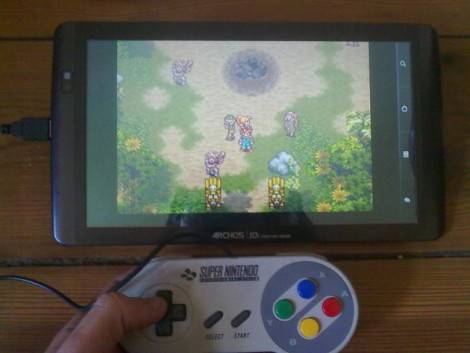
[Kekszumquadrat] wanted to use a classic controller to play emulator games on his Android tablet so he set out to convert an SNES gamepad to connect via USB. He found an old USB keyboard at a yard sale for about 3 Euros. He knew that the emulator he prefers has the option of remapping all the inputs to keyboard keys which means a USB keyboard has all of the electronics he would need to pull this off.
Once he had separated the keyboard circuitry from the case [Kekszumquadrat] plugged it into his Linux box and used Xev to establish how the keyboard matrix is set up. Xev is a common package that opens up an active window on the X desktop. When run from command line, any events that happen to the window will be echoed along with verbose data about that event. When it comes to keypresses, you’ll get the keycode you need. He simply shorted columns and rows until he found the desired mapping, then it was on to soldering.
The SNES controllers are very simple devices. As we’ve seen with previous projects, they use a serial-to-parallel shift register to gather button data and send it to the console. [Kekszumquadrat] simply soldered between button traces and keyboard matrix contacts. Once he finished, the keyboard parts were tucked inside of the controller case and he’s left with a USB controller that appears to be unaltered.
"VMware's mission to bring virtualization to the mobile market gained a major supporter last week whenSamsung pledged to use VMware software to build business-friendly smartphones and tablets. The project known as Horizon Mobile will let Android phones use virtual machine technology to run a second instance of Android, in much the same way virtualization works on servers and desktops. The user essentially has two completely separate phones running on one device, and can switch from the personal one to the corporate one by clicking a 'work phone' icon."There are others pushing alternative approaches to virtualization on mobile devices.
Ah Sony, your S1 and S2 tablet secrets are safe with trusty ol' Engadget. Take these new SGPT113JP/S and SGPT114JP/S tablets that just passed through the FCC. We won't tell anyone that they're actually variants of your S1 tablet, that 9.4-inch jobbie with Android 3.x Honeycomb and custom-made "Quick and Smooth" UI and "Swift" web browser. And mum's the word on the 2.4GHz 802.11n WiFi and WCDMA bands II and V radios -- the latter making an introduction on AT&T (or perhaps Rogers in Canada) highly likely. And you won't hear us making a peep about the Ericsson F5521gw HSPA+ capable modem that's mentioned, the same module spotted in the S2's FCC filing. Really, we won't say a word until this PlayStation Certified tablet hits retail later in the fall.
Viewsonic has announced the release of their budget friendly 7 inch ViewBook 730 Android tablet today. While their tagline of "changing the face of tablets" may be stretching things a bit, this one looks to be a great new product in the multi-purpose eReader category, and appears to have the market currently dominated by the Nook Color directly in its sights.
The ViewBook runs Android 2.2 on a 1GHz CPU, 8 GB internal memory and microSD card support, 1080p playback via its HDMI out port, a VGA front facing camera, and uses a stylus much like the HTC Flyer. On the software side, it comes with the Amazon Appstore and Adobe Flash 10 preinstalled.
The ViewBook will be available the end of June, and carries a MSRP of $249.99. Read the full press release after the break.
ViewSonic Changes the Face of Tablets
New ViewBook® 730 Tablet Is a Fully-Featured Low-Cost Powerhouse
WALNUT, CA--(Marketwire - Jun 6, 2011) - ViewSonic Corp., a leading global provider of computing, consumer electronics and communications solutions, today expanded its tablet offerings with the launch of the ViewBook tablet line and new ViewBook 730.
Designed for the value seeker who doesn't want to compromise on features, the ViewBook 730 makes it easy for anyone to make multimedia mobile. This Android™ 2.2 OS tablet combines a fast and powerful ARM® Cortex-A8 1Ghz processor with Wi-Fi® and Bluetooth® support in a convenient 7" form factor. Whether experiencing 1080p video playback via the HDMI connection, or engaging in video chat and conference calls using the integrated front VGA camera, the ViewBook 730 is the ideal tablet for staying connected and enjoying all the exciting possibilities of digital media content on the move.
With its RiteTouch technology, the ViewBook 730's high-resolution 800x480 LED backlit screen serves as a great tool for pen writing. Whether taking notes in the classroom, highlighting excerpts within a novel or textbook, or working on art projects with the pre-installed Sketcher® app, the included stylus and RiteTouch make it easy to write directly on the screen of the device, swipe across content and scroll through emails.
Fully integrated with the Amazon Appstore, the most popular games and entertainment have already been installed: from Twitter, to Amazon's MP3 music downloader, shopping on Amazon.com, plus YouTube and Mediafly, along with Amazon® Kindle™ software for industry-leading eBook reading.
"In the tablet marketplace, there are plenty of solutions to choose from," said Michael Holstein, vice president of business development, ViewSonic. "We recognized a need for a tablet device that offers users an excellent multimedia experience with a very affordable value proposition. From the pre-installed Amazon Kindle eReader to full Amazon app integration and Flash 10.1 support, our new ViewBook 730 enables consumers to do all the fun things that they want to do on a tablet without the added cost for features they don't need."
In addition to an ample 8GB of memory, the ViewBook 730 offers up to an additional 32GB of storage capacity via the microSD card slot. Teamed with a long-lasting battery for up to 8 hours of use per charge, consumers can bring all their favorite multimedia content with them wherever they go. For added convenience and functionality, the ViewBook 730 offers ViewSonic's AirSync technology to ensure that tablet owners will receive over-the-air device updates as they are rolled out, from feature add-ons to software updates. The ViewBook 730 will be available at the end of June 2011 for an ESP of $249.99.
NVIDIA demoed their new mobile graphics on a Honeycomb with 1280 x 800 resolution. The frame rates run really smooth. The NVIDIA Kal-El GPU has 12-core in it. This demo game Glow Ball will be available soon after this new chip available in the market. The release date expected in this August according to plan.
A few months back, we unveiled Project Kal-El – our next-gen Tegra super chip – as the world’s first mobile quad-core processor. Kal-El combines a battery-friendly, powerhouse of a quad-core processor with a 12-core NVIDIA GPU that supports 3D stereo.
Given that dual-core processors are already on market, you might be wondering how Project Kal-El’s quad-core technology will improve the mobile experience. Rather than try to explain it, we’ve put together a hands-on demo to give you a sneak peek at the new capabilities coming to superphones and tablets later this year.
The video, below, features a demo we created called “Glowball,” which draws its namesake from the feature character: a brilliant lit, bouncing ball.
The ball serves as the light source. As it rolls, it casts its effect on different objects. This shows off the power of true dynamic lighting, rendered in real-time with physics (no canned animations here, folks). Thanks to Project Kal-El, Glowball’s true dynamic lighting brings more life and interactivity to a 3D environment. This marks the first time this type of lighting is feasible on a mobile device.
Glowball also leverages the accelerometer inside the device, affecting real-time movements of drapes throughout the game. As the user tilts the device, the gravity in the scene changes and drapes respond accordingly.
The movements are calculated using physics and are simulated across Project Kal-El’s four CPU cores. Again, no canned animations. As the ball rolls through the drapes, they respond how you’d expect them to in real life. In addition, as the ball collides into the jack-in-the-boxes and barrels, the scene responds. Notice how the visual quality degrades when only two CPU cores are used. It’s clear that the quad-core processor in Project Kal-El is required for this level of realism.
Let us know what you think of the new demo. And stay tuned as we reveal more about the new mobile experiences coming to consumer devices with Project Kal-El.
If you don't already know all about the Samsung Galaxy S II, where have you been the past two months? The successor to one of the most popular Android handsets to date carries a burden of expectation almost as sizable as its 4.3-inch Super AMOLED Plus screen. It promises to be thinner, lighter, and faster than the Galaxy S that preceded it, while garnishing Android 2.3.3 with a set of TouchWiz customizations that might actually enhance, rather than hinder, the user experience. As such, the Galaxy S II earns Samsung full marks for ambition, but does this slinky new smartphone live up to its interstellar hype? The answer, as always, can be found after the break.
Hardware
The Samsung Galaxy S II is 8.49mm (0.33 inches) thick. We whipped out a ruler and checked, it's true. Admittedly, that measurement expands a little at the handset's bottom, where a curvy bump houses its loudspeaker, and around the camera compartment, which protrudes ever so slightly from the rest of the body, but even at its thickest point, this phone doesn't allow itself to go beyond the 1cm mark. Given the veritable spec sheet overload that Samsung has included within the Galaxy S II, we consider its thin profile a stunning feat of engineering. In terms of the pursuit of the absolute slimmest device, NEC's MEDIAS N-04C is still the champ at 7.7mm, but global audiences should feel comfortable in replacing the Sony Ericsson Xperia Arc, which measures 8.7mm at its thinnest point, with the Galaxy S II for their benchmark slim device.
More importantly, Samsung's new 4.3-inch handset feels better in the hand than the Arc, thanks to its intelligently curved sides that provide a comfortable and assured grip. The textured rear cover also feels good to the touch, and should withstand nicks and scratches a lot better than the original Galaxy S' backplate, though don't expect its featherlight construction to contribute much to the phone's overall rigidity. That will be provided by the still-mostly-plastic frame surrounding the phone's screen. We found little cause to doubt the Galaxy S II's durability, though we certainly wouldn't go recommending it as the phone for the builder in your life. There's a minuscule crevice between the handset's frame and screen that looks prone to gathering dust if exposed to dirty environments, and in spite of the generally reassuring build quality, the Galaxy S II is still made out of plastic rather than something more robust like HTC or Nokia's all-aluminum cases.
Returning to the screen, it's fronted by one continuous sheet of glass, which protects a 4.3-inch Super AMOLED Plus display along with a batch of sensors and a front-facing camera at the top, and two capacitive Android keys at the bottom. The earpiece and Home button are the only disruptions to the sleek glass surface. Whatever coating Samsung has applied to the Galaxy S II's screen works very well, as it resists smudges and fingerprint marks much better than the average smartphone. A volume rocker and a power / lock key each take up one side of the GSII, with a 3.5mm headphone jack adorning its top and a micro-USB charging / data port at the bottom. That's it, no frills, no extras, and -- to the dismay of some -- no dedicated camera shutter button. At least the controls you do get all work very well. The side-mounted buttons do their job without fuss and touchscreen responsiveness is impeccable. The Menu and Back keys are purely capacitive, whereas the Home button is, well, an actual button -- it requires you to physically depress it in order to register input. That distinction may feel a bit awkward at first, but we rather enjoyed it. It meant accidental key taps were all but impossible to achieve and gave a more definitive nature to punching the Home key, which somehow felt appropriate given the fact it yanks you out of whatever you're doing and back to the homescreen.
Display
The Galaxy S II's screen is nothing short of spectacular. Blacks are impenetrable, colors pop out at you, and viewing angles are supreme. This would usually be the part where we'd point out that qHD (960 x 540) resolution is fast becoming the norm among top-tier smartphones and that the GSII's 800 x 480 is therefore a bit behind the curve, but frankly, we don't care. With a screen as beautiful as this, such things pale into insignificance. And we use that verb advisedly -- whereas the majority of LCDs quickly lose their luster when you tilt them away from center, color saturation and vibrancy on the Galaxy S II remain undiminished. It is only at extreme angles that you'll notice some discoloration, but that's only if you're looking for it and takes nothing away from the awe-inspiring experience of simply using this device.
Whether you're pushing it to its limits with movie watching or just tamely browsing the web, the Super AMOLED Plus panel inside the Galaxy S II never fails to remind you that it's simply better than almost everything else that's out there. For an instructive example of the contrast on offer here, take a look at our recent post regarding the LG Optimus Big's upcoming launch in Korea. The pattern on that handset's white back was so subtle on our desktop monitor that we completely missed it, whereas when we looked at the same image on the GSII, it looked clear as day. Maybe that doesn't speak too highly of the monitors we're working with, but it underlines the supremacy of the display Samsung has squeezed into the Galaxy S II.
We'd even go so far as to say it's better than the iPhone 4's screen, purely because, at 4.3 inches, it gives us so much more room to work with. It's almost impossible to split the two up in terms of quality of output, they're both top notch. Notably, however, that was also true of Samsung's original Super AMOLED display, the one that graced the 4-inch Galaxy S, and by now you must be wondering if there's actually anything significant enough in the new S-AMOLED technology to justify appending that "Plus" to its name. The short answer is yes, and it's all in the pixels.
The one major downside to the original Super AMOLED panel was to be found in its PenTile matrix subpixel arrangement. It employed an RGBG pattern, wherein you got two green subpixels for every pair of red and blue ones, but the overall resolution was counted on the basis of green subpixels. Ergo, a PenTile 800 x 480 resolution wasn't as rich at the subpixel level as your standard RGB screen (768,000 versus 1,152,000), which resulted in slightly grainier images than would otherwise have been the case. Well, that "otherwise" scenario is now with us, because Samsung has switched to a Real-Stripe RGB array in the 4.3-inch Galaxy S II, which means it packs the full 1.152 megasubpixel count and, as we've already noted, the display looks delectable for it. A lesser criticism of the original Galaxy S was that its colors were a little blown out and oversaturated, but that's once again rendered moot on the successor device -- a software setting called Background effect allows you to tweak saturation, so if you're feeling a little melancholy, you can tone down the intensity of your handset's colors to match your ennui. Basically, if we haven't made it clear already, this is everything that Super AMOLED was, minus the bad parts and plus an extra .3 inches in real estate. A triumph.
Okay, there is one mildly irritating aspect about the Galaxy S II's screen and that's the auto-brightness -- it tends to hunt around for the correct setting and occasionally makes jarring jumps between darker and brighter values. Whether that's down to the ambient light sensor or the software reading data from it isn't all that important, what's relevant is that we found ourselves more comfortable with a human helming the brightness controls.
Battery life
The story of the Galaxy S II's battery life cannot be told without returning to its luscious screen. Being an OLED panel, the 4.3-inch display here doesn't use one single backlight as LCD screens do, and instead only illuminates the pixels that are needed to actively display content. This is the reason why it can generate truer blacks than any backlit panel, but it also permits the user to optimize battery life by doing such things as switching to a darker wallpaper or reading ebooks against a black background. We didn't actually bother with such tweaks, we were too busy exploring every one of the myriad features on this phone, but the option's there as an extra dimension of obsessive control if you care for it. As to the Galaxy S II's actual endurance, we found it highly competitive with the latest batch of Android phones. After 20 hours, half of which were filled with the above tinkering and exploration, we managed to drag the Galaxy S II down to 15 percent of its original charge. This was with our usual push notification suppliers, Gmail and Twitter, running in the background and while constantly connected to our WiFi network.
Using the Android System Info app (available for free on the Android Market), we found confirmation that the Galaxy S II is indeed running a 1.2GHz ARMv7 dual-core processor, but more importantly, we also dug up a breakdown of how often the SOC was reaching that max speed. Only 9.2 percent of our use harnessed the full 1.2GHz, with Samsung wisely downclocking its chip to as low as 200MHz when the phone's idling (that accounted for 46 percent of the Galaxy S II's uptime). What's impressive about this is that we never hit upon any performance bumps to indicate that we were running at slower speeds. Clearly, Samsung's power management system is doing its job well. In summary, we expect you'll be able to get a decent couple of days' regular use out of the Galaxy S II -- our experience with it mirrored what we got out of HTC's Incredible S and Desire S that recently crossed our review bench -- though processor-intensive activities like HD video playback will eat into that, as will the variability of 3G coverage. What we can say with absolute certainty is that the Galaxy S II is no slouch when put against its contemporaries, and it also marks a definite improvement in longevity over the original Galaxy S.
Loudspeaker / earpiece
The loudspeaker is surprisingly passable, hell, it's more than passable. We're probably being swayed by the gorgeous screen on this phone, but playing back video without relying on headphones feels just fine, unlike the usual grinding chore that it is on most current phones. That being said, Tinie Tempah's Pass Out -- a song that starts out dominated by deep bass -- sounds like a hilarious remix of the original on the GSII owing to the speaker's inability to dip down low enough to sound out the track's bassline. Bass deprivation is a typical shortcoming of smartphones, which isn't looking likely to find a fix any time soon. You still won't be forced to abandon your dubstep addiction while on the move, however, as Samsung bundles a solid pair of in-ear headphones that do a very respectable job of both isolating external noise and delivering audio to your cranium. Including an in-line mic that doubles as a music play / pause button is no bad thing either. We'd be remiss not to point out that the Galaxy S II's loudspeaker is positioned rather poorly -- it and the two slits cut into the phone's rump for its output face the rear. Laying the handset down on a flat surface immediately alters the sound and a stray finger - a single fleshy finger -- can mute almost everything.
The earpiece performed as close to the middle of the road as you can get. Calls sounded good on our end and equally so on the other side. We had a couple of garbled moments during one conversation, but that's more likely due to network performance than some fault on the Galaxy S II. As to the network itself, the GSII exhibited no reception issues or aberrant behavior, though we weren't able to check out its rated 21.1Mbps HSPA+ speeds on our UK carrier.
Camera
Samsung eschews the default Gingerbread camera app for its own effort, which comes with a neat slice of customization. The left menu column gives you three shortcut slots for the functions you consider most relevant to your photographic exploits. By default, two of them are populated with a button to flip between the rear-facing 8 megapixel and front-facing 2 megapixel camera and another one for controlling the flash, but you can do whatever you fancy. Resolution, ISO, scene and shooting modes, or adjustments like white balance, contrast, metering, and after-effects can all be included in there. And if you consider different things important when in video mode, that's no problem, because that retains its own set of shortcuts separate from the stills mode. It's a fully realized suite of options, even if most users will neglect the left side and just keep bashing the capture key on the right.
When they do so, they'll be treated to some excellent results. The camera compartment on the back of the Galaxy S II justifies its size (it's still tiny, it just happens to protrude a little bit from the ultrathin GSII body) with the collection of great detail in nearly every shot. What most impressed us about this sensor is that images remained relatively sharp at full resolution -- such as the one you see above, it's a 100 percent crop from an 8 megapixel capture -- with Samsung feeling confident enough in the quality of its hardware to apply almost no noise-reducing blur under default settings. That does permit for graininess to sneak into some images, but on the whole, we're looking at one of the finest smartphone camera sensors around. Closeup shots are handled very well too, in spite of the lack of a dedicated macro mode. The flash is a typically overpowered LED unit, though we were impressed to see the Galaxy S II use it while focusing on a nearby object but not while shooting -- had it been used in the shot, the flash would've whitewashed the entire composition, so it's good to see the software showing a timely bit of restraint.
The only real issue we encountered was that that the GSII's sensor has a predictably narrow dynamic range, meaning that photographs with high contrast between dark and well-lit areas end up with either deep shadows or blown out highlights, depending on which you opt to focus on. Then again, that can lead to some highly artistic / moody shots, so we're not too sure this is a major downer. A limitation, sure, but not something that will seriously impact your enjoyment of snapping pics with this phone.
As to video, it too looks crisp and sharp, though the ever-present rolling shutter effect is very much in evidence when there's rapid motion on screen (see the bus passing by in the sample below). Provided you don't insist on panning around too quickly or recording hound races from the sidelines, that shouldn't pose much of a problem. There's little in the way of image stabilization too, but again, so long as your ambitions stretch no further than casual HD video, the Galaxy S II should prove more than sufficient.
Mobile Handsets
Samsung Galaxy S II review
By Vlad Savov posted Apr 28th 2011 12:44PM
Review
If you don't already know all about the Samsung Galaxy S II, where have you been the past two months? The successor to one of the most popular Android handsets to date carries a burden of expectation almost as sizable as its 4.3-inch Super AMOLED Plus screen. It promises to be thinner, lighter, and faster than the Galaxy S that preceded it, while garnishing Android 2.3.3 with a set of TouchWiz customizations that might actually enhance, rather than hinder, the user experience. As such, the Galaxy S II earns Samsung full marks for ambition, but does this slinky new smartphone live up to its interstellar hype? The answer, as always, can be found after the break.
Samsung Galaxy S II review
Hardware
The Samsung Galaxy S II is 8.49mm (0.33 inches) thick. We whipped out a ruler and checked, it's true. Admittedly, that measurement expands a little at the handset's bottom, where a curvy bump houses its loudspeaker, and around the camera compartment, which protrudes ever so slightly from the rest of the body, but even at its thickest point, this phone doesn't allow itself to go beyond the 1cm mark. Given the veritable spec sheet overload that Samsung has included within the Galaxy S II, we consider its thin profile a stunning feat of engineering. In terms of the pursuit of the absolute slimmest device, NEC's MEDIAS N-04C is still the champ at 7.7mm, but global audiences should feel comfortable in replacing the Sony Ericsson Xperia Arc, which measures 8.7mm at its thinnest point, with the Galaxy S II for their benchmark slim device.
More importantly, Samsung's new 4.3-inch handset feels better in the hand than the Arc, thanks to its intelligently curved sides that provide a comfortable and assured grip. The textured rear cover also feels good to the touch, and should withstand nicks and scratches a lot better than the original Galaxy S' backplate, though don't expect its featherlight construction to contribute much to the phone's overall rigidity. That will be provided by the still-mostly-plastic frame surrounding the phone's screen. We found little cause to doubt the Galaxy S II's durability, though we certainly wouldn't go recommending it as the phone for the builder in your life. There's a minuscule crevice between the handset's frame and screen that looks prone to gathering dust if exposed to dirty environments, and in spite of the generally reassuring build quality, the Galaxy S II is still made out of plastic rather than something more robust like HTC or Nokia's all-aluminum cases.
Returning to the screen, it's fronted by one continuous sheet of glass, which protects a 4.3-inch Super AMOLED Plus display along with a batch of sensors and a front-facing camera at the top, and two capacitive Android keys at the bottom. The earpiece and Home button are the only disruptions to the sleek glass surface. Whatever coating Samsung has applied to the Galaxy S II's screen works very well, as it resists smudges and fingerprint marks much better than the average smartphone. A volume rocker and a power / lock key each take up one side of the GSII, with a 3.5mm headphone jack adorning its top and a micro-USB charging / data port at the bottom. That's it, no frills, no extras, and -- to the dismay of some -- no dedicated camera shutter button. At least the controls you do get all work very well. The side-mounted buttons do their job without fuss and touchscreen responsiveness is impeccable. The Menu and Back keys are purely capacitive, whereas the Home button is, well, an actual button -- it requires you to physically depress it in order to register input. That distinction may feel a bit awkward at first, but we rather enjoyed it. It meant accidental key taps were all but impossible to achieve and gave a more definitive nature to punching the Home key, which somehow felt appropriate given the fact it yanks you out of whatever you're doing and back to the homescreen.
Display
The Galaxy S II's screen is nothing short of spectacular. Blacks are impenetrable, colors pop out at you, and viewing angles are supreme. This would usually be the part where we'd point out that qHD (960 x 540) resolution is fast becoming the norm among top-tier smartphones and that the GSII's 800 x 480 is therefore a bit behind the curve, but frankly, we don't care. With a screen as beautiful as this, such things pale into insignificance. And we use that verb advisedly -- whereas the majority of LCDs quickly lose their luster when you tilt them away from center, color saturation and vibrancy on the Galaxy S II remain undiminished. It is only at extreme angles that you'll notice some discoloration, but that's only if you're looking for it and takes nothing away from the awe-inspiring experience of simply using this device.
Whether you're pushing it to its limits with movie watching or just tamely browsing the web, the Super AMOLED Plus panel inside the Galaxy S II never fails to remind you that it's simply better than almost everything else that's out there. For an instructive example of the contrast on offer here, take a look at our recent post regarding the LG Optimus Big's upcoming launch in Korea. The pattern on that handset's white back was so subtle on our desktop monitor that we completely missed it, whereas when we looked at the same image on the GSII, it looked clear as day. Maybe that doesn't speak too highly of the monitors we're working with, but it underlines the supremacy of the display Samsung has squeezed into the Galaxy S II.
We'd even go so far as to say it's better than the iPhone 4's screen, purely because, at 4.3 inches, it gives us so much more room to work with. It's almost impossible to split the two up in terms of quality of output, they're both top notch. Notably, however, that was also true of Samsung's original Super AMOLED display, the one that graced the 4-inch Galaxy S, and by now you must be wondering if there's actually anything significant enough in the new S-AMOLED technology to justify appending that "Plus" to its name. The short answer is yes, and it's all in the pixels.
The one major downside to the original Super AMOLED panel was to be found in its PenTile matrix subpixel arrangement. It employed an RGBG pattern, wherein you got two green subpixels for every pair of red and blue ones, but the overall resolution was counted on the basis of green subpixels. Ergo, a PenTile 800 x 480 resolution wasn't as rich at the subpixel level as your standard RGB screen (768,000 versus 1,152,000), which resulted in slightly grainier images than would otherwise have been the case. Well, that "otherwise" scenario is now with us, because Samsung has switched to a Real-Stripe RGB array in the 4.3-inch Galaxy S II, which means it packs the full 1.152 megasubpixel count and, as we've already noted, the display looks delectable for it. A lesser criticism of the original Galaxy S was that its colors were a little blown out and oversaturated, but that's once again rendered moot on the successor device -- a software setting called Background effect allows you to tweak saturation, so if you're feeling a little melancholy, you can tone down the intensity of your handset's colors to match your ennui. Basically, if we haven't made it clear already, this is everything that Super AMOLED was, minus the bad parts and plus an extra .3 inches in real estate. A triumph.
Okay, there is one mildly irritating aspect about the Galaxy S II's screen and that's the auto-brightness -- it tends to hunt around for the correct setting and occasionally makes jarring jumps between darker and brighter values. Whether that's down to the ambient light sensor or the software reading data from it isn't all that important, what's relevant is that we found ourselves more comfortable with a human helming the brightness controls.
Battery life
The story of the Galaxy S II's battery life cannot be told without returning to its luscious screen. Being an OLED panel, the 4.3-inch display here doesn't use one single backlight as LCD screens do, and instead only illuminates the pixels that are needed to actively display content. This is the reason why it can generate truer blacks than any backlit panel, but it also permits the user to optimize battery life by doing such things as switching to a darker wallpaper or reading ebooks against a black background. We didn't actually bother with such tweaks, we were too busy exploring every one of the myriad features on this phone, but the option's there as an extra dimension of obsessive control if you care for it. As to the Galaxy S II's actual endurance, we found it highly competitive with the latest batch of Android phones. After 20 hours, half of which were filled with the above tinkering and exploration, we managed to drag the Galaxy S II down to 15 percent of its original charge. This was with our usual push notification suppliers, Gmail and Twitter, running in the background and while constantly connected to our WiFi network.
Using the Android System Info app (available for free on the Android Market), we found confirmation that the Galaxy S II is indeed running a 1.2GHz ARMv7 dual-core processor, but more importantly, we also dug up a breakdown of how often the SOC was reaching that max speed. Only 9.2 percent of our use harnessed the full 1.2GHz, with Samsung wisely downclocking its chip to as low as 200MHz when the phone's idling (that accounted for 46 percent of the Galaxy S II's uptime). What's impressive about this is that we never hit upon any performance bumps to indicate that we were running at slower speeds. Clearly, Samsung's power management system is doing its job well. In summary, we expect you'll be able to get a decent couple of days' regular use out of the Galaxy S II -- our experience with it mirrored what we got out of HTC's Incredible S and Desire S that recently crossed our review bench -- though processor-intensive activities like HD video playback will eat into that, as will the variability of 3G coverage. What we can say with absolute certainty is that the Galaxy S II is no slouch when put against its contemporaries, and it also marks a definite improvement in longevity over the original Galaxy S.
Loudspeaker / earpiece
The loudspeaker is surprisingly passable, hell, it's more than passable. We're probably being swayed by the gorgeous screen on this phone, but playing back video without relying on headphones feels just fine, unlike the usual grinding chore that it is on most current phones. That being said, Tinie Tempah's Pass Out -- a song that starts out dominated by deep bass -- sounds like a hilarious remix of the original on the GSII owing to the speaker's inability to dip down low enough to sound out the track's bassline. Bass deprivation is a typical shortcoming of smartphones, which isn't looking likely to find a fix any time soon. You still won't be forced to abandon your dubstep addiction while on the move, however, as Samsung bundles a solid pair of in-ear headphones that do a very respectable job of both isolating external noise and delivering audio to your cranium. Including an in-line mic that doubles as a music play / pause button is no bad thing either. We'd be remiss not to point out that the Galaxy S II's loudspeaker is positioned rather poorly -- it and the two slits cut into the phone's rump for its output face the rear. Laying the handset down on a flat surface immediately alters the sound and a stray finger - a single fleshy finger -- can mute almost everything.
The earpiece performed as close to the middle of the road as you can get. Calls sounded good on our end and equally so on the other side. We had a couple of garbled moments during one conversation, but that's more likely due to network performance than some fault on the Galaxy S II. As to the network itself, the GSII exhibited no reception issues or aberrant behavior, though we weren't able to check out its rated 21.1Mbps HSPA+ speeds on our UK carrier.
Camera
Samsung eschews the default Gingerbread camera app for its own effort, which comes with a neat slice of customization. The left menu column gives you three shortcut slots for the functions you consider most relevant to your photographic exploits. By default, two of them are populated with a button to flip between the rear-facing 8 megapixel and front-facing 2 megapixel camera and another one for controlling the flash, but you can do whatever you fancy. Resolution, ISO, scene and shooting modes, or adjustments like white balance, contrast, metering, and after-effects can all be included in there. And if you consider different things important when in video mode, that's no problem, because that retains its own set of shortcuts separate from the stills mode. It's a fully realized suite of options, even if most users will neglect the left side and just keep bashing the capture key on the right.
When they do so, they'll be treated to some excellent results. The camera compartment on the back of the Galaxy S II justifies its size (it's still tiny, it just happens to protrude a little bit from the ultrathin GSII body) with the collection of great detail in nearly every shot. What most impressed us about this sensor is that images remained relatively sharp at full resolution -- such as the one you see above, it's a 100 percent crop from an 8 megapixel capture -- with Samsung feeling confident enough in the quality of its hardware to apply almost no noise-reducing blur under default settings. That does permit for graininess to sneak into some images, but on the whole, we're looking at one of the finest smartphone camera sensors around. Closeup shots are handled very well too, in spite of the lack of a dedicated macro mode. The flash is a typically overpowered LED unit, though we were impressed to see the Galaxy S II use it while focusing on a nearby object but not while shooting -- had it been used in the shot, the flash would've whitewashed the entire composition, so it's good to see the software showing a timely bit of restraint.
The only real issue we encountered was that that the GSII's sensor has a predictably narrow dynamic range, meaning that photographs with high contrast between dark and well-lit areas end up with either deep shadows or blown out highlights, depending on which you opt to focus on. Then again, that can lead to some highly artistic / moody shots, so we're not too sure this is a major downer. A limitation, sure, but not something that will seriously impact your enjoyment of snapping pics with this phone.
Samsung Galaxy S II camera samples
As to video, it too looks crisp and sharp, though the ever-present rolling shutter effect is very much in evidence when there's rapid motion on screen (see the bus passing by in the sample below). Provided you don't insist on panning around too quickly or recording hound races from the sidelines, that shouldn't pose much of a problem. There's little in the way of image stabilization too, but again, so long as your ambitions stretch no further than casual HD video, the Galaxy S II should prove more than sufficient.
Even when pushed to record at 1080p, the Galaxy S II showed no sign of slowdown or even any processing lag. Speed of operation, both in stills and video, is as fast as we've seen yet. The time taken to enter the camera app, process one image and be ready for the next, and to switch between camera and camcorder modes was in all cases supreme. We consider that a big part of a successful camera's mechanics -- being able and ready to respond to the user immediately instead of making him -- so the Galaxy S II scores another big tick from us. Samsung also provides a Photo editor app that lets you tweak, crop and stylize your imagery. It covers all the basics and throws in a few fun extras for those who like to experiment.
Mobile Handsets
Samsung Galaxy S II review
By Vlad Savov posted Apr 28th 2011 12:44PM
Review
If you don't already know all about the Samsung Galaxy S II, where have you been the past two months? The successor to one of the most popular Android handsets to date carries a burden of expectation almost as sizable as its 4.3-inch Super AMOLED Plus screen. It promises to be thinner, lighter, and faster than the Galaxy S that preceded it, while garnishing Android 2.3.3 with a set of TouchWiz customizations that might actually enhance, rather than hinder, the user experience. As such, the Galaxy S II earns Samsung full marks for ambition, but does this slinky new smartphone live up to its interstellar hype? The answer, as always, can be found after the break.
Samsung Galaxy S II review
Hardware
The Samsung Galaxy S II is 8.49mm (0.33 inches) thick. We whipped out a ruler and checked, it's true. Admittedly, that measurement expands a little at the handset's bottom, where a curvy bump houses its loudspeaker, and around the camera compartment, which protrudes ever so slightly from the rest of the body, but even at its thickest point, this phone doesn't allow itself to go beyond the 1cm mark. Given the veritable spec sheet overload that Samsung has included within the Galaxy S II, we consider its thin profile a stunning feat of engineering. In terms of the pursuit of the absolute slimmest device, NEC's MEDIAS N-04C is still the champ at 7.7mm, but global audiences should feel comfortable in replacing the Sony Ericsson Xperia Arc, which measures 8.7mm at its thinnest point, with the Galaxy S II for their benchmark slim device.
More importantly, Samsung's new 4.3-inch handset feels better in the hand than the Arc, thanks to its intelligently curved sides that provide a comfortable and assured grip. The textured rear cover also feels good to the touch, and should withstand nicks and scratches a lot better than the original Galaxy S' backplate, though don't expect its featherlight construction to contribute much to the phone's overall rigidity. That will be provided by the still-mostly-plastic frame surrounding the phone's screen. We found little cause to doubt the Galaxy S II's durability, though we certainly wouldn't go recommending it as the phone for the builder in your life. There's a minuscule crevice between the handset's frame and screen that looks prone to gathering dust if exposed to dirty environments, and in spite of the generally reassuring build quality, the Galaxy S II is still made out of plastic rather than something more robust like HTC or Nokia's all-aluminum cases.
Returning to the screen, it's fronted by one continuous sheet of glass, which protects a 4.3-inch Super AMOLED Plus display along with a batch of sensors and a front-facing camera at the top, and two capacitive Android keys at the bottom. The earpiece and Home button are the only disruptions to the sleek glass surface. Whatever coating Samsung has applied to the Galaxy S II's screen works very well, as it resists smudges and fingerprint marks much better than the average smartphone. A volume rocker and a power / lock key each take up one side of the GSII, with a 3.5mm headphone jack adorning its top and a micro-USB charging / data port at the bottom. That's it, no frills, no extras, and -- to the dismay of some -- no dedicated camera shutter button. At least the controls you do get all work very well. The side-mounted buttons do their job without fuss and touchscreen responsiveness is impeccable. The Menu and Back keys are purely capacitive, whereas the Home button is, well, an actual button -- it requires you to physically depress it in order to register input. That distinction may feel a bit awkward at first, but we rather enjoyed it. It meant accidental key taps were all but impossible to achieve and gave a more definitive nature to punching the Home key, which somehow felt appropriate given the fact it yanks you out of whatever you're doing and back to the homescreen.
Display
The Galaxy S II's screen is nothing short of spectacular. Blacks are impenetrable, colors pop out at you, and viewing angles are supreme. This would usually be the part where we'd point out that qHD (960 x 540) resolution is fast becoming the norm among top-tier smartphones and that the GSII's 800 x 480 is therefore a bit behind the curve, but frankly, we don't care. With a screen as beautiful as this, such things pale into insignificance. And we use that verb advisedly -- whereas the majority of LCDs quickly lose their luster when you tilt them away from center, color saturation and vibrancy on the Galaxy S II remain undiminished. It is only at extreme angles that you'll notice some discoloration, but that's only if you're looking for it and takes nothing away from the awe-inspiring experience of simply using this device.
Whether you're pushing it to its limits with movie watching or just tamely browsing the web, the Super AMOLED Plus panel inside the Galaxy S II never fails to remind you that it's simply better than almost everything else that's out there. For an instructive example of the contrast on offer here, take a look at our recent post regarding the LG Optimus Big's upcoming launch in Korea. The pattern on that handset's white back was so subtle on our desktop monitor that we completely missed it, whereas when we looked at the same image on the GSII, it looked clear as day. Maybe that doesn't speak too highly of the monitors we're working with, but it underlines the supremacy of the display Samsung has squeezed into the Galaxy S II.
We'd even go so far as to say it's better than the iPhone 4's screen, purely because, at 4.3 inches, it gives us so much more room to work with. It's almost impossible to split the two up in terms of quality of output, they're both top notch. Notably, however, that was also true of Samsung's original Super AMOLED display, the one that graced the 4-inch Galaxy S, and by now you must be wondering if there's actually anything significant enough in the new S-AMOLED technology to justify appending that "Plus" to its name. The short answer is yes, and it's all in the pixels.
The one major downside to the original Super AMOLED panel was to be found in its PenTile matrix subpixel arrangement. It employed an RGBG pattern, wherein you got two green subpixels for every pair of red and blue ones, but the overall resolution was counted on the basis of green subpixels. Ergo, a PenTile 800 x 480 resolution wasn't as rich at the subpixel level as your standard RGB screen (768,000 versus 1,152,000), which resulted in slightly grainier images than would otherwise have been the case. Well, that "otherwise" scenario is now with us, because Samsung has switched to a Real-Stripe RGB array in the 4.3-inch Galaxy S II, which means it packs the full 1.152 megasubpixel count and, as we've already noted, the display looks delectable for it. A lesser criticism of the original Galaxy S was that its colors were a little blown out and oversaturated, but that's once again rendered moot on the successor device -- a software setting called Background effect allows you to tweak saturation, so if you're feeling a little melancholy, you can tone down the intensity of your handset's colors to match your ennui. Basically, if we haven't made it clear already, this is everything that Super AMOLED was, minus the bad parts and plus an extra .3 inches in real estate. A triumph.
Okay, there is one mildly irritating aspect about the Galaxy S II's screen and that's the auto-brightness -- it tends to hunt around for the correct setting and occasionally makes jarring jumps between darker and brighter values. Whether that's down to the ambient light sensor or the software reading data from it isn't all that important, what's relevant is that we found ourselves more comfortable with a human helming the brightness controls.
Battery life
The story of the Galaxy S II's battery life cannot be told without returning to its luscious screen. Being an OLED panel, the 4.3-inch display here doesn't use one single backlight as LCD screens do, and instead only illuminates the pixels that are needed to actively display content. This is the reason why it can generate truer blacks than any backlit panel, but it also permits the user to optimize battery life by doing such things as switching to a darker wallpaper or reading ebooks against a black background. We didn't actually bother with such tweaks, we were too busy exploring every one of the myriad features on this phone, but the option's there as an extra dimension of obsessive control if you care for it. As to the Galaxy S II's actual endurance, we found it highly competitive with the latest batch of Android phones. After 20 hours, half of which were filled with the above tinkering and exploration, we managed to drag the Galaxy S II down to 15 percent of its original charge. This was with our usual push notification suppliers, Gmail and Twitter, running in the background and while constantly connected to our WiFi network.
Using the Android System Info app (available for free on the Android Market), we found confirmation that the Galaxy S II is indeed running a 1.2GHz ARMv7 dual-core processor, but more importantly, we also dug up a breakdown of how often the SOC was reaching that max speed. Only 9.2 percent of our use harnessed the full 1.2GHz, with Samsung wisely downclocking its chip to as low as 200MHz when the phone's idling (that accounted for 46 percent of the Galaxy S II's uptime). What's impressive about this is that we never hit upon any performance bumps to indicate that we were running at slower speeds. Clearly, Samsung's power management system is doing its job well. In summary, we expect you'll be able to get a decent couple of days' regular use out of the Galaxy S II -- our experience with it mirrored what we got out of HTC's Incredible S and Desire S that recently crossed our review bench -- though processor-intensive activities like HD video playback will eat into that, as will the variability of 3G coverage. What we can say with absolute certainty is that the Galaxy S II is no slouch when put against its contemporaries, and it also marks a definite improvement in longevity over the original Galaxy S.
Loudspeaker / earpiece
The loudspeaker is surprisingly passable, hell, it's more than passable. We're probably being swayed by the gorgeous screen on this phone, but playing back video without relying on headphones feels just fine, unlike the usual grinding chore that it is on most current phones. That being said, Tinie Tempah's Pass Out -- a song that starts out dominated by deep bass -- sounds like a hilarious remix of the original on the GSII owing to the speaker's inability to dip down low enough to sound out the track's bassline. Bass deprivation is a typical shortcoming of smartphones, which isn't looking likely to find a fix any time soon. You still won't be forced to abandon your dubstep addiction while on the move, however, as Samsung bundles a solid pair of in-ear headphones that do a very respectable job of both isolating external noise and delivering audio to your cranium. Including an in-line mic that doubles as a music play / pause button is no bad thing either. We'd be remiss not to point out that the Galaxy S II's loudspeaker is positioned rather poorly -- it and the two slits cut into the phone's rump for its output face the rear. Laying the handset down on a flat surface immediately alters the sound and a stray finger - a single fleshy finger -- can mute almost everything.
The earpiece performed as close to the middle of the road as you can get. Calls sounded good on our end and equally so on the other side. We had a couple of garbled moments during one conversation, but that's more likely due to network performance than some fault on the Galaxy S II. As to the network itself, the GSII exhibited no reception issues or aberrant behavior, though we weren't able to check out its rated 21.1Mbps HSPA+ speeds on our UK carrier.
Camera
Samsung eschews the default Gingerbread camera app for its own effort, which comes with a neat slice of customization. The left menu column gives you three shortcut slots for the functions you consider most relevant to your photographic exploits. By default, two of them are populated with a button to flip between the rear-facing 8 megapixel and front-facing 2 megapixel camera and another one for controlling the flash, but you can do whatever you fancy. Resolution, ISO, scene and shooting modes, or adjustments like white balance, contrast, metering, and after-effects can all be included in there. And if you consider different things important when in video mode, that's no problem, because that retains its own set of shortcuts separate from the stills mode. It's a fully realized suite of options, even if most users will neglect the left side and just keep bashing the capture key on the right.
When they do so, they'll be treated to some excellent results. The camera compartment on the back of the Galaxy S II justifies its size (it's still tiny, it just happens to protrude a little bit from the ultrathin GSII body) with the collection of great detail in nearly every shot. What most impressed us about this sensor is that images remained relatively sharp at full resolution -- such as the one you see above, it's a 100 percent crop from an 8 megapixel capture -- with Samsung feeling confident enough in the quality of its hardware to apply almost no noise-reducing blur under default settings. That does permit for graininess to sneak into some images, but on the whole, we're looking at one of the finest smartphone camera sensors around. Closeup shots are handled very well too, in spite of the lack of a dedicated macro mode. The flash is a typically overpowered LED unit, though we were impressed to see the Galaxy S II use it while focusing on a nearby object but not while shooting -- had it been used in the shot, the flash would've whitewashed the entire composition, so it's good to see the software showing a timely bit of restraint.
The only real issue we encountered was that that the GSII's sensor has a predictably narrow dynamic range, meaning that photographs with high contrast between dark and well-lit areas end up with either deep shadows or blown out highlights, depending on which you opt to focus on. Then again, that can lead to some highly artistic / moody shots, so we're not too sure this is a major downer. A limitation, sure, but not something that will seriously impact your enjoyment of snapping pics with this phone.
Samsung Galaxy S II camera samples
As to video, it too looks crisp and sharp, though the ever-present rolling shutter effect is very much in evidence when there's rapid motion on screen (see the bus passing by in the sample below). Provided you don't insist on panning around too quickly or recording hound races from the sidelines, that shouldn't pose much of a problem. There's little in the way of image stabilization too, but again, so long as your ambitions stretch no further than casual HD video, the Galaxy S II should prove more than sufficient.
Even when pushed to record at 1080p, the Galaxy S II showed no sign of slowdown or even any processing lag. Speed of operation, both in stills and video, is as fast as we've seen yet. The time taken to enter the camera app, process one image and be ready for the next, and to switch between camera and camcorder modes was in all cases supreme. We consider that a big part of a successful camera's mechanics -- being able and ready to respond to the user immediately instead of making him -- so the Galaxy S II scores another big tick from us. Samsung also provides a Photo editor app that lets you tweak, crop and stylize your imagery. It covers all the basics and throws in a few fun extras for those who like to experiment.
Software
General responsiveness is absolutely exemplary. If you've read what we had to say about the G2x and the way it simply flies through homescreens, menus and applications, you'll know that we have a high bar for Android performance already set, but the Galaxy S II beats it anyway. There's simply never been an Android handset this smooth and this fluid in its operation. Nothing phases the GSII, and the only time we got it to show any performance dropoff was in enacting a pinching gesture on the home screen to bring up an Exposé-like overview of all seven homescreens. That's seven fully loaded-out homescreens with information updating live (multiple clocks plus news and weather feeds) and the only thing that recipe for memory overload produced was a slight stutter in animating the zooming effect. There's just no getting around the extravagant amounts of power this device has and we can't wait to see Samsung jam one of these Exynos chips inside a future tablet or two.
We know you like your benchmarks, so we might as well hit you with those all-important numbers. Do take heed, however, that graphical tests such as those in Quadrant and Neocore perform at the phone's native resolution, which will bias results in favor of lower-res screens -- so don't take what you see as a conclusive performance comparison, use it just as an indicator. With that out of the way, here are the scores: Quadrant gave us results in the 3,000 to 3,400 range, Linpack produced an average of 47 MFLOPS, and Nenamark and Neocore both brought in a 59.8fps average that was limited by a 60fps software cap on the phone (a suspicion that was further confirmed by running Fps2D and seeing the same behavior). It's a shame that we weren't able to properly quantify the true maximum capability of the Exynos dual-core chip and Mali-400 graphics within, but that Quadrant score can be taken as highly representative of the chasm that exists between the Galaxy S II and smartphones that have come before it. It really is that much better. Put simply, this is the most powerful mobile handset we've yet tested.