The Galaxy Nexus (formerly referred to as the Nexus Prime) carries on the Nexus torch in spectacular fashion, and we've just spent a few quality moments with one here at the launch event. Design-wise, it's clear that the Nexus S DNA is here, though the rear reminds us most of the Galaxy S II. Those who abhor physical buttons will also be delighted, and while we'd gotten used to the whole Power + Home for a screenshot on the GSII, Power + Volume Down works just fine on this fellow.......
PSHax member - Google has taken the stage in Hong Kong to make the next version of Android OS, nicknamed Ice Cream Sandwich, a thing of reality. Better known as Android 4.0, the update offers a massive redesign to the user interface and adds a plethora of new features. Some of the highlights include an NFC-enabled feature called Android Beam, offline search in Gmail, new lock screen features and a fancy unlocking method called "Face Unlock," which uses facial recognition to ensure strangers can't use your phone without permission. Ice Cream Sandwich also includes enhancements in.....
Mutricy mentioned that while the company's new flagship device was designed for Gingerbread, plans have been set to introduce the latest version of Android in the start of 2012, with a more precise date naturally on its way. Given past experience, however, it's probable that the unbranded version of the device will get the refresh ahead of the Droid RAZR on Verizon, so US users may need to exercise a wee bit of patience here. Regardless, it's time for the competition to step up......
Hark! The first renders of the HTC Rezound have appeared online, thanks to some of the device's cases going up for pre-order. You can see that, like the Sensation XE, the phone has red-glowing soft keys -- a bit of a departure from HTC's traditionally conservative design language. If you recall, the phone formerly called Vigor is said to have a 4.3-inch screen, a dual-core 1.5GHz processor, 1GB RAM, Beats Audio and an 8MP rear camera.....
So what is the GT-B9150? It is a 5.3-inch sAMOLED HD Dual display device that runs Android and will likely officially be called the 'Samsung Galaxy Q'. The rumor mill suggest it will run on an EXYNOS 5250 processor and will have 2GB of RAM. Other specs are believed to be an 8MP back cam, a 2MP front cam, NFC, Wi-Fi, Bluetooth and a 3500mAh battery.
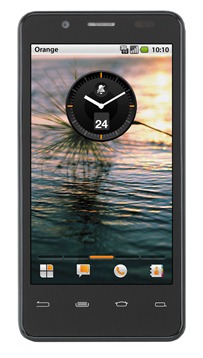
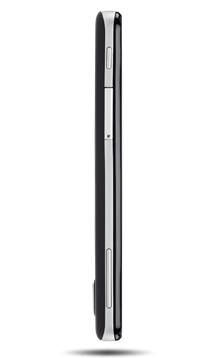
Intel has been conspicuously absent from the mobile arms race in recent years but 2012 is the year the company changes all that. After a significant showing at CES this year, Intel has now teamed up with Orange to deliver San Diego. No, not the city, and get used to making the distinction. The San Diego is Europe's first Intel-powered Android phone.
The 4.03" device will be powered by the 1.6GHz Intel Atom Z2460, and run on an HSPA+ network. The device also packs an 8MP camera, supporting 1080p video capture, and HDMI out. In an effort to keep up with the One X and the SGSIII, the camera also features a burst mode, boasting the ability to take up to 10 photos inside of a second.
Of course, the deciding factor for many of us is what version of Android it's running. Press shots confusingly show the ancient 2.2 and earlier style status bar, however the demo video above, as well as the device's page on Orange's shop, indicate that it is, in fact, running Gingerbread. Given how far behind Intel has been in the mobile world, it's not surprising they aren't ready to ship an ICS handset yet, but launching a flagship with Gingerbread in this mobile landscape is still going to be a very hard sell. The device will pack 16GB of internal storage and launch on June 6th.
It was only a matter of time before rumors of an Xperia Play 2 started floating around. The original was released over a year ago and has since only seen different versions for different carriers sporting special colors but no hardware changes. Before we dive into this on any sort of level, seriously consider this a big fat rumor of mass proportions.
Back in September of 2011 we reported on Sony Ericsson telling us during an interview at VDCC 2011 that they are not ruling out an Xperia Play 2 type of device. Now that Sony owns the Ericsson branch, this is more than likely possible. For a second generation device to even matter though, the hardware at launch would have to be way better then what the original Play came with when it launched. Now we get to enter the rumor...
The rumor is that Sony is currently working on a new generation device, essentially an Xperia Play 2. While the layout of the buttons and controls won't really change much aside from some aesthetics to better suit Sony's look, the hardware that will be coming with this rumored device seems pretty solid. So far the rumored specs are a4.3-inches running a resolution of 1280 x 720, a 8.1MP camera with LED flash and 16X zoom. It is also said to have a 1.5GHz Qualcomm Snapdragon S4 dual-core processor stuffed inside of it.
Most recently,South Korean vendors will present Optimus 3D Max. As the name implies, Optimus 3D Max is a smartphone with a 3 dimensional map can be seen without the aid of glasses. Androidhandset is the successor to 3D Optimus that have circulated about a year.
“Optimus 3D Max LG born of constant effort to bring theentertainment experience to a higher level users. Optimus 3D Maxis the real evidence LG’s commitment to a portable 3D entertainment,” said Park Jong-seon, CEO of LG which quoted from the Inquirer, Friday (24 / 2/2012).
Optimus 3D Max is lighter and thinner than its predecessor, with a thickness of 9.6 mm and weight 148 grams. To record a 3-Dimages or video, 3D Max wore Optimus dual 5-megapixel cameraon the back. The key specs are 1.2 GHz dual core processor, 4.3 inch screenWVGA 3 Dimensions, 1GB RAM, 8GB of internal storage, NFC,HDMI, DLNA and 1620 mAh battery. There is a 3D converter forvariety of applications including Google Maps.
Android 2.3 operating system is still Gingerbread which will be upgraded to Android 4.0 Ice Cream Sandwich. Optimus 3D Maxwas first sold in South Korea next month, then to various parts of the world. Unfortunately, the price range has not been mentioned.
Another quad-core Android device has decided to show up today, this time coming from LG. Currently we know of two quad-core devices in the works, one of which is from Fujitsu which we played with at CES 2012, and the second rumored to be from HTC. Now we have a third which is coming from LG called the X3.
The LG X3, as it is currently names, will also be a true HD phone like the Nitro or Spectrum, running at 1280x720 resolution on a 4.7" screen. The chipset inside will bea Tegra 3 quad-core chipset from nVidia and the outside will play host to an 8MP rear camera and a 1.3MP front-facing camera. This new quad-core device should also come right out of the box with Ice Cream Sandwich (Android 4.0).
Other specs floating around include 16GB of storage, a 2000mAh battery, a 21Mbps HSPA radio (with the possibility of LTE versions in certain areas), physical capacitive and not touchscreen buttons, and also a fabled NFC transceiver. So far it the LG X3 sounds like a beastly little phone.
If you want to nab one of these though you will have to wait a bit as the release for the LG X3 is slated for sometime in late Spring to early Summer. No word yet on what carrier(s) will get the device although I'm hoping for T-Mobile. We could see this unveiled at Mobile World Congress next month.
Hark! The first renders of the HTC Rezound have appeared online, thanks to some of the device's cases going up for pre-order. You can see that, like the Sensation XE, the phone has red-glowing soft keys -- a bit of a departure from HTC's traditionally conservative design language. If you recall, the phone formerly called Vigor is said to have a 4.3-inch screen, a dual-core 1.5GHz processor, 1GB RAM, Beats Audio and an 8MP rear camera. Now that you know what the Verizon 4G cellular telephone will look like, you'll be able to pick one out of a lineup when it's available, which should be on November 10th for $300 on contract.
We know that Samsung has the first crack at Android 4.0 with the Galaxy Nexus, but it'll only be a matter of time before we begin seeing it show up on rival devices. HTC has already made an official statement on its plans (or lack thereof), and now it's Motorola's turn. Alain Mutricy, SVP Portfolio and Product Management, was in Germany talking up the European announcement of the RAZR, and slipped in a few details about Ice Cream Sandwich. Mutricy mentioned that while the company's new flagship device was designed for Gingerbread, plans have been set to introduce the latest version of Android in the start of 2012, with a more precise date naturally on its way. Given past experience, however, it's probable that the unbranded version of the device will get the refresh ahead of the Droid RAZR on Verizon, so US users may need to exercise a wee bit of patience here. Regardless, it's time for the competition to step up -- if the RAZR is next in line to get the OTA update, the Galaxy Nexus will have the spotlight all to itself for a fair amount of time.
Remember the Droid RAZR? That's so yesterday. Or, earlier today. Whatever. The point is, Samsung's just busted out the planet's first Ice Cream Sandwich-based smartphone here in Hong Kong, a few days late but hardly worse for the wear. The Galaxy Nexus (formerly referred to as the Nexus Prime) carries on the Nexus torch in spectacular fashion, and we've just spent a few quality moments with one here at the launch event. Design-wise, it's clear that the Nexus S DNA is here, though the rear reminds us most of the Galaxy S II. Those who abhor physical buttons will also be delighted, and while we'd gotten used to the whole Power + Home for a screenshot on the GSII, Power + Volume Down works just fine on this fellow.
The 1.2GHz dual-core processor was startlingly fast. It actually felt a wee bit quicker than our Galaxy S II, and given that Ice Cream Sandwich and the Galaxy Nexus were apparently built for one another, we're assuming there's some deeply ingrained optimizations to thank. Swiping from pane to pane was faster than its ever been on Android, and the new Roboto font actually is super eye-pleasing. The touch response of the capacitive buttons -- much like those on the original Nexus One -- take a bit of getting used to, and we had to mash 'em just a touch harder than we anticipated to elicit a response.
The overall phone feels adequately thin, and while the 4.65-inch display sounds gargantuan, the handset itself doesn't feel so massive to hold. Until, of course, you grab the comparatively minuscule Nexus One. Still, we've been clamoring for a 1,280 x 720 display on a smartphone for what feels like forever, and now that it's here on the Galaxy Nexus, we aren't about to kvetch. Indeed, the panel looks downright gorgeous, with unbeatable viewing angles, remarkably crisp text and graphics and a beautiful feel as one swipes across it. The fingerprint magnet that is a glossy overcoat is still here, but it's the only feel niggle we've found on the screen as a whole.
Having the 3.5mm headphone jack on the rear seems like a necessary design choice given the tapering at the top, and unlike that other phone, there's no mute switch here -- you'll just have to hold the Volume Down button for a few seconds. The rear cover pops off in similar fashion to the Galaxy S II, but the ridged plastic cover has a far softer touch than the aforesaid contemporary. The camera is also situated right in the center, with branding kept to a minimum. Oddly enough, we're being told by Samsung that two models will be available in terms of capacity -- a 16 gigger and a 32GB sibling -- but neither will have a microSD slot for adding your own expansion.
The lack of a physical Home button may be disorienting for Galaxy S II loyalists, but the Galaxy Nexus is truly the first smartphone that expresses Google's desire to make "one Android for all" -- a mantra we heard about at Google I/O, but haven't seen birthed into anything until today. Digging into the particulars of Ice Cream Sandwich a bit, it's clear that folks who aren't elevated to Android 4.0 (we're still waiting on word of what phones will and won't make the leap) will be missing out on a fair bit. Face Unlock isn't particularly special in our estimation -- typical laptops have been using this forever, and we've never found 'em to be entirely intuitive. However, the bump-to-share functionality that was lost when webOS croaked will undoubtedly be cause for celebration. Also, just so it's known, the Galaxy Nexus we played with here was running Android 4.0.1.
The data usage manager is a total godsend in this nasty, depressing world of tiers, and while apps have done similar things for quite some time, tight integration like this is hugely appreciated. We found in our play time that ICS was amazingly responsive in every aspect. Swiping was a breeze. Gestures worked beautifully. The entire experience just felt polished. In a way, it's as if Android's growing a bit and maturing before our eyes, and it's obvious that Goog's focused on making its mobile OS as "enchanting" (Google's word, not ours) as iOS seems to be.
Overall, we're thrilled with how the first ICS handset has turned out. It's understated, sleek, beautiful and packs a display that's destined to drop jaws. Now, if only we knew how much, and what carriers...
Wait no more. Google and Samsung have just made the long-awaited Galaxy Nexus (not longer the Nexus Prime, as we'd once heard) official here in Hong Kong, and the specifications are downright drool-worthy. Those with bantam hands need not apply, as this 4.65-inch behemoth is bound to bring back talk of Sidetalkin'. Naturally, Ice Cream Sandwich is onboard, with Google finally revealing the version number as 4.0. Other specs include an HD Super AMOLED display (1,280 x 720), a 1.2GHz dual-core processor, 5 megapixel rear camera (with LED flash), a 1.3 megapixel front-facing cam, 1080p video recording and playback, a newfangled panorama mode, a 3.5mm headphone jack and Bluetooth 3.0. You'll also find USB 2.0, 802.11a/b/g/n WiFi, an embedded NFC module, accelerometer, compass, gyro, proximity sensor and even a barometer -- yeah, a barometer. Finishing things out, there's 1GB of RAM, 16 or 32GB of internal storage space and a 1,750mAh battery. As for radios? There's an HSPA+ model on tap, while an LTE version will "be available depending on region." There's nary a mention of carrier in the press release we're holding, but based on earlier leaks, a 4G build for Verizon Wireless seems a lock.
Focusing on Ice Cream Sandwich for a tick, Android 4.0 will bring "an entirely new look and feel to Android," boasting a redesigned user interface, bolstered multitasking / notifications, full-on NFC support and a new People app, which enables users to browse friends, family and coworkers' photos whilst peeking their status updates from Google+. ICS also introduces Face Unlock, which taps into facial recognition protocols in order to unlock your handset. And then there's Android Beam, an NFC-based technology that allows you to "quickly share webpages, apps and YouTube videos by simply tapping two phones together." According to Goog, the "lock screen, home screen, phone app and everything in between has been rethought and redesigned," and this is quite the beastly phone to launch with.
It wouldn't be a Motorola event without a glut of accessories, and boy howdy did the company deliver on that front. Sure, the Droid RAZR may not actually be out yet, but when it does hit, the handset will have plenty of things to hold it, dock it, charge it and stream stuff from it. In fact, Motorola devoted a full room to the things at today's event. First and foremost are two additions to the Lapdock family. The docking station comes in new flavors: the Lapdock 500 ($300) and the Lapdock 100 ($200), measuring 14 and 10.1 inches, respectively. The 500 ($300) features a front-facing camera (a first on a Lapdock), as well as Ethernet and VGA sockets. As with its successors, the handset rests in the rear of the Lapdock, utilizing Webtop to turn your smartphone into a laptop. Also on display was the Droid RAZR car dock ($40), from which you can access your music from the company's new cloud-based Motocast service and play it through your car stereo.
Sprint shone some light on the latest mystery handset from LG earlier today -- and what a bright light it is indeed. The Marquee's four-inch NOVA display is one of the brightest on the market -- it's a sort "we can't technically say it's the brightest, but it's certainly up there" situation. Screen aside, this is a slick and skinny Gingerbread handset. It's got a large display, but it feels nice in the hand. There's a 1GHz processor inside, so it's certainly not the most powerful phone we seen, but it felt quite zippy during our time with it. The carrier will be offering the phone up for pre-sale on September 20th -- those who get in early will start receiving their phones on September 29th. Everyone else will have to wait for October 2nd. The handset will run $100 with a two-year contract. Check out a hands-on video after the jump.
Samsung certainly had its moment in the sun last week, but it appears that another alluring smartphone will soon emerge from South Korea -- this time as the Optimus Note from LG -- which presents itself in the wild and with a leaked press shot. It's said to feature a 1.2GHz dual-core Tegra 2, along with a 4-inch WVGA NOVA display and Gingerbread. We can also expect a 5 megapixel primary shooter with an LED flash on the rear, a front-facing VGA cam up front, 8GB of internal storage and WiFi Direct capability. The device itself is 12.3mm thick, which accommodates a four-row sliding QWERTY keyboard. While this version seems destined for LG's home territory, we can't help but wonder if we'll see similar specs in the Optimus Slider that's bound Sprint. Also, since the phone has yet to become official, perhaps a last minute name change is in order? As you ponder this final point, hop the break and take a squint at Mr. Blurrycam's finest.
"VMware's mission to bring virtualization to the mobile market gained a major supporter last week whenSamsung pledged to use VMware software to build business-friendly smartphones and tablets. The project known as Horizon Mobile will let Android phones use virtual machine technology to run a second instance of Android, in much the same way virtualization works on servers and desktops. The user essentially has two completely separate phones running on one device, and can switch from the personal one to the corporate one by clicking a 'work phone' icon."There are others pushing alternative approaches to virtualization on mobile devices.
We don't know if this device is "super confidential" or not, but we've just come across yet another Nokia N9 lookalike with a non-MeeGo operating system on board. Well, it looks that way, anyhow. There's no way to verify that the Android homescreen we see above is a legitimate Gingerbread installation and not a mere screenshot (the resolution looks all wrong, for one thing), but the source of this image is the same Chinese fellow that posted a picture of Nokia's Windows Phone prototype, the Sea Ray, way back in May, so we're inclined to believe he's got an inside line on these things. Additionally, the undersized Android UI elements on the screen actually encourage us to believe that this is indeed a Nokia testing device -- if we were going to fake something like this, we'd use a regular screen grab for our tomfoolery -- and Stephen Elop has openly admitted that Nokia spent a couple of wild seconds contemplating a switch to Android. Well, folks, here's what that alternate future might have looked like.
There were more Droid Bionic leak pictures of upcoming Motorola Droid. The latest pictures show some more information about the specs. In addition of that, Droid Bionic seem to give a new experience with the handset Atrix-like docking connection. This suggesting that new and improved user experience will include the option of a so-called lapdock.
The Droid Bionic come with Android 2.3.4, 4.5 inch qHD display, 1750 mAh battery, and 1080p HD video out.
No, it's not an upgrade to Honeycomb, but the HTC Flyer is getting some tweaks nonetheless. Over the weekend, owners of the 7-inch tablet should have seen a prompt for an over-the-air update making the vague promise to "improve system performance." We're naturally all kinds of curious, particularly given that the battery life and overall performance were already pretty solid. Flyer owners, are you noticing any differences? Do tell.
If pads and phones are the fastest growing categories in consumer tech, surely a Padfone would be the ultimate combo? That's what ASUS thinks, and it's just introduced an Android smartphone device that comes with a tablet it can dock into.
Chairman Jonney Shih unveils the stunning Padfone device, a 3D tablet, ultra-thin and light notebooks and netbooks, plus the world's first PC motion sensing controller and a sleek 27" All-in-One HD desktop
Taipei, Taiwan (Computex, May 30, 2011) - ASUS Chairman Jonney Shih has unveiled the highly-anticipated Padfone along with the latest ASUS innovations, which include new UX Series notebooks, redesigned N Series notebooks with SonicMaster audio technology, the revolutionary and versatile Eee Pad Memo 3D, ultra-thin Eee PC X101 netbooks, and unique home entertainment devices such as the motion-sensing WAVI Xtion and the 27" All-in-One high-definition ET2700XVT desktop PC. With "Break the Rules, Innovation Beyond Expectations" as the dominant theme this year, Mr. Shih has reiterated the company's strength in cutting-edge designs and superior engineering skills to help bring users the devices of their dreams.
"Breaking the rules and changing the status quo are the keys to our success, and we strive to offer customers an experience that surpasses their expectations," said Mr. Shih.
Padfone elevates consumer choice to new levels
Innovation is at the heart of ASUS design and the new Padfone reveals exciting new possibilities for mobile computing and communication. This convergent device combines a smartphone and a tablet computer into one symbiotic gadget that allows consumers to choose the screen size that best fits their activities while seamlessly sharing data and 3G internet access.
UX Series ultraportables
ASUS is noted for its exquisite design, and nowhere else is this more evident than in the new UX Series, developed in close cooperation with Intel® to ensure the best products become available to consumers. These astonishingly thin ultraportables are made possible through the use of a strong but light aluminum alloy shell with a unique 'spun' finish on polished surfaces. The artistry of the series draws inspiration from luxury timepieces, displaying sharp edges, an oversized keyboard and smartphone-like touchpad for added comfort, as well as reinforced hinges for extended longevity. Measuring a mere 17mm at its thickest point, the needle-thin UX Series nonetheless packs impressive specifications, with the latest 2nd generation Intel® Core™ mobile processors up to the powerful i7, SATA 6Gb/s solid-state drives and the Instant On feature, which resumes the notebook in seconds.
N Series notebooks and All-in-One PC with SonicMaster
ASUS continues to innovate in PC audio. The same SonicMaster technology that ASUS first developed with Bang & Olufsen ICEpower® for the incredible NX90 can now be enjoyed on the new N Series, where stunning high-gloss designs meet the very latest mobile technology. This latest N Series, co-designed by ASUS and world renowned designer David Lewis, comes with the addition of a dedicated external subwoofer for deep bass extension that would otherwise be impossible to replicate on a notebook. Desktop PC users can also experience the same well-appointed luxury with the 27" HD All-in-One ET2700XVT desktop PC, which offers ultra-wide 178-degree viewing angles and optional 10-point multi-touch for smooth, fully consolidated computing.
Eee Pad MeMO 3D adds depth to tablet devices
Recognizing that no two users have quite the same needs when it comes to tablets, ASUS has introduced a fourth tablet to go alongside the recently announced Eee Pad Transformer, Eee Pad Slider and Eee Slate. Powered by the latest version of the Android operating system, the Eee Pad MeMO 3D has a 7" multi-touch screen that can also be used with the supplied stylus for note taking in portrait orientation, plus a unique glasses-free 3D display mode for entertainment on the go.
The Eee Pad MeMO 3D is designed to be an alternative take on the 10" tablet that is fast becoming a standard size. This portrait-oriented device uses a screen that can also be used more traditionally with all Android Honeycomb applications, should users choose to do so.
Eee PC evolved
ASUS evolves the Eee PC further with new models that take netbooks to ever-greater heights. The new Eee PC X101 has been designed from the start to be the perfect ultraportable for modern mobile users, with its Intel® MeeGo operating system incorporating full support for a wide range of social networking services. Eee PC X101 Series netbooks are also offered with the Windows® 7 operating system, and models ship with both solid state and mechanical hard drive storage configurations.
Wireless home entertainment with WAVI Xtion
Drawing on its research and development foundations, ASUS has worked closely with PrimeSense™, the leader in motion-sensing technology, in crafting the world's first and only open-source, controller-free gesture-based device for PC. WAVI Xtion offers limitless enjoyment for consumers, upscaling PC fun onto big screen TV. The technology represents total integration of multimedia, social networking and gaming. The Xtion Browser affords internet usage with hand and body movements for an interactive experience, expanding web content with larger fonts, icons and graphics for livelier navigation. The Xtion Portal acts as an app store where users can purchase new games and utilities designed for WAVI Xtion, while social networking becomes more intuitive with a controller-free interface and exciting gesture input, also using an attractive visual style. WAVI Xtion ships with a game bundle that includes MayaFit™, Beat Booster, and DanceWall™, all perfect for exercise and fun for the entire family. Better still, the Xtion Engine incorporates gesture-based controls into many existing PC games, so consumers can experience them in a completely new way.
PRODUCT APPENDICES
Padfone
The ASUS Padfone is a device that explores one possible convergence between two popular mobile devices - the smartphone and tablet. The Padfone solves the problem of data transfer hassles and multiple SIM cards when both a smartphone and 3G tablet are used. With the Padfone, the smartphone docks inside the tablet to give users an expanded view to suit their tasks. With the phone docked, it can recharge from the tablet's larger battery and the tablet can also make use of the smartphone's 3G internet connection. The dual interfaces for both the pad and phone ensure an enhanced user experience as the layout is automatically adjusted for all activities such as video conferencing, web browsing and emailing.
UX Series
Notebook PC users demand the very best performance in increasingly portable packages, which is exactly what the new ASUS UX Series delivers. Clad in a svelte aluminum alloy shell that has a unique 'spun' finish, the UX Series packs a number of impressive features, including 2nd generation Intel® Core™ mobile processors, including the powerful i7, to ensure blistering performance. Up to 7-hour battery charges mean that the UX Series is always ready for action - and with the Instant On feature it resumes work in seconds.
N Series
The new ASUS N Series combines a stunning design with the very latest mobile technology and legendary SonicMaster audio, which has already made a name for the ASUS NX90. The slim, glossy black exterior denotes a premium notebook with specifications to match, including cutting-edge features such as second generation Intel® Core™ mobile processors and USB 3.0. Developed together with Bang & Olufsen ICEpower®, ASUS SonicMaster ensures that the N Series sounds as good as it looks, with oversized internal speakers, sophisticated audio processing and a bundled dedicated subwoofer that delivers deep, rich bass that belies the notebook's compact size. This latest N Series is co-designed by ASUS and renowned designer David Lewis.
Eee Pad MeMO 3D
The ASUS Eee Pad MeMO 3D is designed to be an alternative take on the 10" tablet that is fast becoming a standard size. This portrait-oriented device has a 7" multi-touch screen that can be used in the usual way with Android Honeycomb applications, but there's also the added twist of stylus support, so users can opt for handwriting input and treat the MeMO 3D much like a digital notepad. Productivity is only one area where the Memo 3D scores highly, though. The bundled MeMIC Bluetooth hands-free headset makes it ideal for listening to music and making calls, while flipping the MeMO 3D into landscape turns it into a glasses-free 3D display that adds a new dimension to mobile entertainment. Consumers can enjoy movies, games and photos in 3D, all from the palm of their hand.
Eee PC X101
The ASUS Eee PC X101 is a new netbook that is designed to perfectly meet the needs of the modern mobile user who lives and works online. Just 17.6mm thick and weighing less than 950g, the Eee PC X101 can be slipped into a bag and taken anywhere, but this is no cut-down portable computer - it packs a 10.1" screen, QWERTY keyboard and the latest Intel® Atom™ N435 processor.
Users can get online with 802.11b/g/n Wi-Fi, where the Eee PC X101 really comes into its own. The Intel® MeeGo operating system has full support for a wide range of social networking services and a raft of productivity tools built in, making this a netbook that's ready for use right out of the box. There's also the X101H model, which has all the same features but comes with a hybrid hard drive and choice of Window® 7 or MeeGo.
WAVI Xtion
ASUS WAVI Xtion is a sophisticated multi-component technology, and the result of extensive cooperation, innovation and development. While ASUS has been working closely with PrimeSense™ in creating the core technology behind WAVI Xtion, the product also brings to market a host of additional pioneering highlights. Collaboration with AppSide has resulted in the creation of Xtion Portal, and ASUS has also worked with Hillcrest on the highly-interactive Xtion Browser. Bundled game DanceWall™, which gets consumers physically active as they enjoy themselves with family and friends, was developed by Softkinetic Studios.
All-in-One ET2700XVT
Featuring a 27" HD display with ultra-wide 178-degree viewing angles, HDMI-in ports, a digital TV tuner and SonicMaster audio, the ASUS All-in-One ET2700XVT is the perfect desktop for any home or office. This is more than a mere monitor - it is a full PC at far less the space requirements of other desktops, with optional 10-point multi-touch that makes it ideal for entertainment applications.
It turns out that almost all the Android phones and tablets out there are vulnerable to a very easy attack. Researchers at the University of Ulm in Germany discovered an exploit in all devices running anything before Android 2.3.3. In short, any time you sign into a service like Twitter or Facebook, your device stores an authToken that is good for 14 days. And it's really easy for hackers to get that authToken. Basically, they set up an access point with a common SSID like “default” or “attwifi”. If you turn on the Wi-Fi on your Android device and have it set to automatically connect to previously known networks, it will likely try to connect to this “new” access point. Then, your phone will automatically try to connect to Twitter, Facebook, and so on to sync up the accounts using the stored authTokens. And that's when the “hacker” can nab the authTokens and essentially gain access to all of those accounts. Not good. The easiest solution? Simply de-activate the auto-connect feature in your Android's Wi-Fi settings.
If you don't already know all about the Samsung Galaxy S II, where have you been the past two months? The successor to one of the most popular Android handsets to date carries a burden of expectation almost as sizable as its 4.3-inch Super AMOLED Plus screen. It promises to be thinner, lighter, and faster than the Galaxy S that preceded it, while garnishing Android 2.3.3 with a set of TouchWiz customizations that might actually enhance, rather than hinder, the user experience. As such, the Galaxy S II earns Samsung full marks for ambition, but does this slinky new smartphone live up to its interstellar hype? The answer, as always, can be found after the break.
Hardware
The Samsung Galaxy S II is 8.49mm (0.33 inches) thick. We whipped out a ruler and checked, it's true. Admittedly, that measurement expands a little at the handset's bottom, where a curvy bump houses its loudspeaker, and around the camera compartment, which protrudes ever so slightly from the rest of the body, but even at its thickest point, this phone doesn't allow itself to go beyond the 1cm mark. Given the veritable spec sheet overload that Samsung has included within the Galaxy S II, we consider its thin profile a stunning feat of engineering. In terms of the pursuit of the absolute slimmest device, NEC's MEDIAS N-04C is still the champ at 7.7mm, but global audiences should feel comfortable in replacing the Sony Ericsson Xperia Arc, which measures 8.7mm at its thinnest point, with the Galaxy S II for their benchmark slim device.
More importantly, Samsung's new 4.3-inch handset feels better in the hand than the Arc, thanks to its intelligently curved sides that provide a comfortable and assured grip. The textured rear cover also feels good to the touch, and should withstand nicks and scratches a lot better than the original Galaxy S' backplate, though don't expect its featherlight construction to contribute much to the phone's overall rigidity. That will be provided by the still-mostly-plastic frame surrounding the phone's screen. We found little cause to doubt the Galaxy S II's durability, though we certainly wouldn't go recommending it as the phone for the builder in your life. There's a minuscule crevice between the handset's frame and screen that looks prone to gathering dust if exposed to dirty environments, and in spite of the generally reassuring build quality, the Galaxy S II is still made out of plastic rather than something more robust like HTC or Nokia's all-aluminum cases.
Returning to the screen, it's fronted by one continuous sheet of glass, which protects a 4.3-inch Super AMOLED Plus display along with a batch of sensors and a front-facing camera at the top, and two capacitive Android keys at the bottom. The earpiece and Home button are the only disruptions to the sleek glass surface. Whatever coating Samsung has applied to the Galaxy S II's screen works very well, as it resists smudges and fingerprint marks much better than the average smartphone. A volume rocker and a power / lock key each take up one side of the GSII, with a 3.5mm headphone jack adorning its top and a micro-USB charging / data port at the bottom. That's it, no frills, no extras, and -- to the dismay of some -- no dedicated camera shutter button. At least the controls you do get all work very well. The side-mounted buttons do their job without fuss and touchscreen responsiveness is impeccable. The Menu and Back keys are purely capacitive, whereas the Home button is, well, an actual button -- it requires you to physically depress it in order to register input. That distinction may feel a bit awkward at first, but we rather enjoyed it. It meant accidental key taps were all but impossible to achieve and gave a more definitive nature to punching the Home key, which somehow felt appropriate given the fact it yanks you out of whatever you're doing and back to the homescreen.
Display
The Galaxy S II's screen is nothing short of spectacular. Blacks are impenetrable, colors pop out at you, and viewing angles are supreme. This would usually be the part where we'd point out that qHD (960 x 540) resolution is fast becoming the norm among top-tier smartphones and that the GSII's 800 x 480 is therefore a bit behind the curve, but frankly, we don't care. With a screen as beautiful as this, such things pale into insignificance. And we use that verb advisedly -- whereas the majority of LCDs quickly lose their luster when you tilt them away from center, color saturation and vibrancy on the Galaxy S II remain undiminished. It is only at extreme angles that you'll notice some discoloration, but that's only if you're looking for it and takes nothing away from the awe-inspiring experience of simply using this device.
Whether you're pushing it to its limits with movie watching or just tamely browsing the web, the Super AMOLED Plus panel inside the Galaxy S II never fails to remind you that it's simply better than almost everything else that's out there. For an instructive example of the contrast on offer here, take a look at our recent post regarding the LG Optimus Big's upcoming launch in Korea. The pattern on that handset's white back was so subtle on our desktop monitor that we completely missed it, whereas when we looked at the same image on the GSII, it looked clear as day. Maybe that doesn't speak too highly of the monitors we're working with, but it underlines the supremacy of the display Samsung has squeezed into the Galaxy S II.
We'd even go so far as to say it's better than the iPhone 4's screen, purely because, at 4.3 inches, it gives us so much more room to work with. It's almost impossible to split the two up in terms of quality of output, they're both top notch. Notably, however, that was also true of Samsung's original Super AMOLED display, the one that graced the 4-inch Galaxy S, and by now you must be wondering if there's actually anything significant enough in the new S-AMOLED technology to justify appending that "Plus" to its name. The short answer is yes, and it's all in the pixels.
The one major downside to the original Super AMOLED panel was to be found in its PenTile matrix subpixel arrangement. It employed an RGBG pattern, wherein you got two green subpixels for every pair of red and blue ones, but the overall resolution was counted on the basis of green subpixels. Ergo, a PenTile 800 x 480 resolution wasn't as rich at the subpixel level as your standard RGB screen (768,000 versus 1,152,000), which resulted in slightly grainier images than would otherwise have been the case. Well, that "otherwise" scenario is now with us, because Samsung has switched to a Real-Stripe RGB array in the 4.3-inch Galaxy S II, which means it packs the full 1.152 megasubpixel count and, as we've already noted, the display looks delectable for it. A lesser criticism of the original Galaxy S was that its colors were a little blown out and oversaturated, but that's once again rendered moot on the successor device -- a software setting called Background effect allows you to tweak saturation, so if you're feeling a little melancholy, you can tone down the intensity of your handset's colors to match your ennui. Basically, if we haven't made it clear already, this is everything that Super AMOLED was, minus the bad parts and plus an extra .3 inches in real estate. A triumph.
Okay, there is one mildly irritating aspect about the Galaxy S II's screen and that's the auto-brightness -- it tends to hunt around for the correct setting and occasionally makes jarring jumps between darker and brighter values. Whether that's down to the ambient light sensor or the software reading data from it isn't all that important, what's relevant is that we found ourselves more comfortable with a human helming the brightness controls.
Battery life
The story of the Galaxy S II's battery life cannot be told without returning to its luscious screen. Being an OLED panel, the 4.3-inch display here doesn't use one single backlight as LCD screens do, and instead only illuminates the pixels that are needed to actively display content. This is the reason why it can generate truer blacks than any backlit panel, but it also permits the user to optimize battery life by doing such things as switching to a darker wallpaper or reading ebooks against a black background. We didn't actually bother with such tweaks, we were too busy exploring every one of the myriad features on this phone, but the option's there as an extra dimension of obsessive control if you care for it. As to the Galaxy S II's actual endurance, we found it highly competitive with the latest batch of Android phones. After 20 hours, half of which were filled with the above tinkering and exploration, we managed to drag the Galaxy S II down to 15 percent of its original charge. This was with our usual push notification suppliers, Gmail and Twitter, running in the background and while constantly connected to our WiFi network.
Using the Android System Info app (available for free on the Android Market), we found confirmation that the Galaxy S II is indeed running a 1.2GHz ARMv7 dual-core processor, but more importantly, we also dug up a breakdown of how often the SOC was reaching that max speed. Only 9.2 percent of our use harnessed the full 1.2GHz, with Samsung wisely downclocking its chip to as low as 200MHz when the phone's idling (that accounted for 46 percent of the Galaxy S II's uptime). What's impressive about this is that we never hit upon any performance bumps to indicate that we were running at slower speeds. Clearly, Samsung's power management system is doing its job well. In summary, we expect you'll be able to get a decent couple of days' regular use out of the Galaxy S II -- our experience with it mirrored what we got out of HTC's Incredible S and Desire S that recently crossed our review bench -- though processor-intensive activities like HD video playback will eat into that, as will the variability of 3G coverage. What we can say with absolute certainty is that the Galaxy S II is no slouch when put against its contemporaries, and it also marks a definite improvement in longevity over the original Galaxy S.
Loudspeaker / earpiece
The loudspeaker is surprisingly passable, hell, it's more than passable. We're probably being swayed by the gorgeous screen on this phone, but playing back video without relying on headphones feels just fine, unlike the usual grinding chore that it is on most current phones. That being said, Tinie Tempah's Pass Out -- a song that starts out dominated by deep bass -- sounds like a hilarious remix of the original on the GSII owing to the speaker's inability to dip down low enough to sound out the track's bassline. Bass deprivation is a typical shortcoming of smartphones, which isn't looking likely to find a fix any time soon. You still won't be forced to abandon your dubstep addiction while on the move, however, as Samsung bundles a solid pair of in-ear headphones that do a very respectable job of both isolating external noise and delivering audio to your cranium. Including an in-line mic that doubles as a music play / pause button is no bad thing either. We'd be remiss not to point out that the Galaxy S II's loudspeaker is positioned rather poorly -- it and the two slits cut into the phone's rump for its output face the rear. Laying the handset down on a flat surface immediately alters the sound and a stray finger - a single fleshy finger -- can mute almost everything.
The earpiece performed as close to the middle of the road as you can get. Calls sounded good on our end and equally so on the other side. We had a couple of garbled moments during one conversation, but that's more likely due to network performance than some fault on the Galaxy S II. As to the network itself, the GSII exhibited no reception issues or aberrant behavior, though we weren't able to check out its rated 21.1Mbps HSPA+ speeds on our UK carrier.
Camera
Samsung eschews the default Gingerbread camera app for its own effort, which comes with a neat slice of customization. The left menu column gives you three shortcut slots for the functions you consider most relevant to your photographic exploits. By default, two of them are populated with a button to flip between the rear-facing 8 megapixel and front-facing 2 megapixel camera and another one for controlling the flash, but you can do whatever you fancy. Resolution, ISO, scene and shooting modes, or adjustments like white balance, contrast, metering, and after-effects can all be included in there. And if you consider different things important when in video mode, that's no problem, because that retains its own set of shortcuts separate from the stills mode. It's a fully realized suite of options, even if most users will neglect the left side and just keep bashing the capture key on the right.
When they do so, they'll be treated to some excellent results. The camera compartment on the back of the Galaxy S II justifies its size (it's still tiny, it just happens to protrude a little bit from the ultrathin GSII body) with the collection of great detail in nearly every shot. What most impressed us about this sensor is that images remained relatively sharp at full resolution -- such as the one you see above, it's a 100 percent crop from an 8 megapixel capture -- with Samsung feeling confident enough in the quality of its hardware to apply almost no noise-reducing blur under default settings. That does permit for graininess to sneak into some images, but on the whole, we're looking at one of the finest smartphone camera sensors around. Closeup shots are handled very well too, in spite of the lack of a dedicated macro mode. The flash is a typically overpowered LED unit, though we were impressed to see the Galaxy S II use it while focusing on a nearby object but not while shooting -- had it been used in the shot, the flash would've whitewashed the entire composition, so it's good to see the software showing a timely bit of restraint.
The only real issue we encountered was that that the GSII's sensor has a predictably narrow dynamic range, meaning that photographs with high contrast between dark and well-lit areas end up with either deep shadows or blown out highlights, depending on which you opt to focus on. Then again, that can lead to some highly artistic / moody shots, so we're not too sure this is a major downer. A limitation, sure, but not something that will seriously impact your enjoyment of snapping pics with this phone.
As to video, it too looks crisp and sharp, though the ever-present rolling shutter effect is very much in evidence when there's rapid motion on screen (see the bus passing by in the sample below). Provided you don't insist on panning around too quickly or recording hound races from the sidelines, that shouldn't pose much of a problem. There's little in the way of image stabilization too, but again, so long as your ambitions stretch no further than casual HD video, the Galaxy S II should prove more than sufficient.
Mobile Handsets
Samsung Galaxy S II review
By Vlad Savov posted Apr 28th 2011 12:44PM
Review
If you don't already know all about the Samsung Galaxy S II, where have you been the past two months? The successor to one of the most popular Android handsets to date carries a burden of expectation almost as sizable as its 4.3-inch Super AMOLED Plus screen. It promises to be thinner, lighter, and faster than the Galaxy S that preceded it, while garnishing Android 2.3.3 with a set of TouchWiz customizations that might actually enhance, rather than hinder, the user experience. As such, the Galaxy S II earns Samsung full marks for ambition, but does this slinky new smartphone live up to its interstellar hype? The answer, as always, can be found after the break.
Samsung Galaxy S II review
Hardware
The Samsung Galaxy S II is 8.49mm (0.33 inches) thick. We whipped out a ruler and checked, it's true. Admittedly, that measurement expands a little at the handset's bottom, where a curvy bump houses its loudspeaker, and around the camera compartment, which protrudes ever so slightly from the rest of the body, but even at its thickest point, this phone doesn't allow itself to go beyond the 1cm mark. Given the veritable spec sheet overload that Samsung has included within the Galaxy S II, we consider its thin profile a stunning feat of engineering. In terms of the pursuit of the absolute slimmest device, NEC's MEDIAS N-04C is still the champ at 7.7mm, but global audiences should feel comfortable in replacing the Sony Ericsson Xperia Arc, which measures 8.7mm at its thinnest point, with the Galaxy S II for their benchmark slim device.
More importantly, Samsung's new 4.3-inch handset feels better in the hand than the Arc, thanks to its intelligently curved sides that provide a comfortable and assured grip. The textured rear cover also feels good to the touch, and should withstand nicks and scratches a lot better than the original Galaxy S' backplate, though don't expect its featherlight construction to contribute much to the phone's overall rigidity. That will be provided by the still-mostly-plastic frame surrounding the phone's screen. We found little cause to doubt the Galaxy S II's durability, though we certainly wouldn't go recommending it as the phone for the builder in your life. There's a minuscule crevice between the handset's frame and screen that looks prone to gathering dust if exposed to dirty environments, and in spite of the generally reassuring build quality, the Galaxy S II is still made out of plastic rather than something more robust like HTC or Nokia's all-aluminum cases.
Returning to the screen, it's fronted by one continuous sheet of glass, which protects a 4.3-inch Super AMOLED Plus display along with a batch of sensors and a front-facing camera at the top, and two capacitive Android keys at the bottom. The earpiece and Home button are the only disruptions to the sleek glass surface. Whatever coating Samsung has applied to the Galaxy S II's screen works very well, as it resists smudges and fingerprint marks much better than the average smartphone. A volume rocker and a power / lock key each take up one side of the GSII, with a 3.5mm headphone jack adorning its top and a micro-USB charging / data port at the bottom. That's it, no frills, no extras, and -- to the dismay of some -- no dedicated camera shutter button. At least the controls you do get all work very well. The side-mounted buttons do their job without fuss and touchscreen responsiveness is impeccable. The Menu and Back keys are purely capacitive, whereas the Home button is, well, an actual button -- it requires you to physically depress it in order to register input. That distinction may feel a bit awkward at first, but we rather enjoyed it. It meant accidental key taps were all but impossible to achieve and gave a more definitive nature to punching the Home key, which somehow felt appropriate given the fact it yanks you out of whatever you're doing and back to the homescreen.
Display
The Galaxy S II's screen is nothing short of spectacular. Blacks are impenetrable, colors pop out at you, and viewing angles are supreme. This would usually be the part where we'd point out that qHD (960 x 540) resolution is fast becoming the norm among top-tier smartphones and that the GSII's 800 x 480 is therefore a bit behind the curve, but frankly, we don't care. With a screen as beautiful as this, such things pale into insignificance. And we use that verb advisedly -- whereas the majority of LCDs quickly lose their luster when you tilt them away from center, color saturation and vibrancy on the Galaxy S II remain undiminished. It is only at extreme angles that you'll notice some discoloration, but that's only if you're looking for it and takes nothing away from the awe-inspiring experience of simply using this device.
Whether you're pushing it to its limits with movie watching or just tamely browsing the web, the Super AMOLED Plus panel inside the Galaxy S II never fails to remind you that it's simply better than almost everything else that's out there. For an instructive example of the contrast on offer here, take a look at our recent post regarding the LG Optimus Big's upcoming launch in Korea. The pattern on that handset's white back was so subtle on our desktop monitor that we completely missed it, whereas when we looked at the same image on the GSII, it looked clear as day. Maybe that doesn't speak too highly of the monitors we're working with, but it underlines the supremacy of the display Samsung has squeezed into the Galaxy S II.
We'd even go so far as to say it's better than the iPhone 4's screen, purely because, at 4.3 inches, it gives us so much more room to work with. It's almost impossible to split the two up in terms of quality of output, they're both top notch. Notably, however, that was also true of Samsung's original Super AMOLED display, the one that graced the 4-inch Galaxy S, and by now you must be wondering if there's actually anything significant enough in the new S-AMOLED technology to justify appending that "Plus" to its name. The short answer is yes, and it's all in the pixels.
The one major downside to the original Super AMOLED panel was to be found in its PenTile matrix subpixel arrangement. It employed an RGBG pattern, wherein you got two green subpixels for every pair of red and blue ones, but the overall resolution was counted on the basis of green subpixels. Ergo, a PenTile 800 x 480 resolution wasn't as rich at the subpixel level as your standard RGB screen (768,000 versus 1,152,000), which resulted in slightly grainier images than would otherwise have been the case. Well, that "otherwise" scenario is now with us, because Samsung has switched to a Real-Stripe RGB array in the 4.3-inch Galaxy S II, which means it packs the full 1.152 megasubpixel count and, as we've already noted, the display looks delectable for it. A lesser criticism of the original Galaxy S was that its colors were a little blown out and oversaturated, but that's once again rendered moot on the successor device -- a software setting called Background effect allows you to tweak saturation, so if you're feeling a little melancholy, you can tone down the intensity of your handset's colors to match your ennui. Basically, if we haven't made it clear already, this is everything that Super AMOLED was, minus the bad parts and plus an extra .3 inches in real estate. A triumph.
Okay, there is one mildly irritating aspect about the Galaxy S II's screen and that's the auto-brightness -- it tends to hunt around for the correct setting and occasionally makes jarring jumps between darker and brighter values. Whether that's down to the ambient light sensor or the software reading data from it isn't all that important, what's relevant is that we found ourselves more comfortable with a human helming the brightness controls.
Battery life
The story of the Galaxy S II's battery life cannot be told without returning to its luscious screen. Being an OLED panel, the 4.3-inch display here doesn't use one single backlight as LCD screens do, and instead only illuminates the pixels that are needed to actively display content. This is the reason why it can generate truer blacks than any backlit panel, but it also permits the user to optimize battery life by doing such things as switching to a darker wallpaper or reading ebooks against a black background. We didn't actually bother with such tweaks, we were too busy exploring every one of the myriad features on this phone, but the option's there as an extra dimension of obsessive control if you care for it. As to the Galaxy S II's actual endurance, we found it highly competitive with the latest batch of Android phones. After 20 hours, half of which were filled with the above tinkering and exploration, we managed to drag the Galaxy S II down to 15 percent of its original charge. This was with our usual push notification suppliers, Gmail and Twitter, running in the background and while constantly connected to our WiFi network.
Using the Android System Info app (available for free on the Android Market), we found confirmation that the Galaxy S II is indeed running a 1.2GHz ARMv7 dual-core processor, but more importantly, we also dug up a breakdown of how often the SOC was reaching that max speed. Only 9.2 percent of our use harnessed the full 1.2GHz, with Samsung wisely downclocking its chip to as low as 200MHz when the phone's idling (that accounted for 46 percent of the Galaxy S II's uptime). What's impressive about this is that we never hit upon any performance bumps to indicate that we were running at slower speeds. Clearly, Samsung's power management system is doing its job well. In summary, we expect you'll be able to get a decent couple of days' regular use out of the Galaxy S II -- our experience with it mirrored what we got out of HTC's Incredible S and Desire S that recently crossed our review bench -- though processor-intensive activities like HD video playback will eat into that, as will the variability of 3G coverage. What we can say with absolute certainty is that the Galaxy S II is no slouch when put against its contemporaries, and it also marks a definite improvement in longevity over the original Galaxy S.
Loudspeaker / earpiece
The loudspeaker is surprisingly passable, hell, it's more than passable. We're probably being swayed by the gorgeous screen on this phone, but playing back video without relying on headphones feels just fine, unlike the usual grinding chore that it is on most current phones. That being said, Tinie Tempah's Pass Out -- a song that starts out dominated by deep bass -- sounds like a hilarious remix of the original on the GSII owing to the speaker's inability to dip down low enough to sound out the track's bassline. Bass deprivation is a typical shortcoming of smartphones, which isn't looking likely to find a fix any time soon. You still won't be forced to abandon your dubstep addiction while on the move, however, as Samsung bundles a solid pair of in-ear headphones that do a very respectable job of both isolating external noise and delivering audio to your cranium. Including an in-line mic that doubles as a music play / pause button is no bad thing either. We'd be remiss not to point out that the Galaxy S II's loudspeaker is positioned rather poorly -- it and the two slits cut into the phone's rump for its output face the rear. Laying the handset down on a flat surface immediately alters the sound and a stray finger - a single fleshy finger -- can mute almost everything.
The earpiece performed as close to the middle of the road as you can get. Calls sounded good on our end and equally so on the other side. We had a couple of garbled moments during one conversation, but that's more likely due to network performance than some fault on the Galaxy S II. As to the network itself, the GSII exhibited no reception issues or aberrant behavior, though we weren't able to check out its rated 21.1Mbps HSPA+ speeds on our UK carrier.
Camera
Samsung eschews the default Gingerbread camera app for its own effort, which comes with a neat slice of customization. The left menu column gives you three shortcut slots for the functions you consider most relevant to your photographic exploits. By default, two of them are populated with a button to flip between the rear-facing 8 megapixel and front-facing 2 megapixel camera and another one for controlling the flash, but you can do whatever you fancy. Resolution, ISO, scene and shooting modes, or adjustments like white balance, contrast, metering, and after-effects can all be included in there. And if you consider different things important when in video mode, that's no problem, because that retains its own set of shortcuts separate from the stills mode. It's a fully realized suite of options, even if most users will neglect the left side and just keep bashing the capture key on the right.
When they do so, they'll be treated to some excellent results. The camera compartment on the back of the Galaxy S II justifies its size (it's still tiny, it just happens to protrude a little bit from the ultrathin GSII body) with the collection of great detail in nearly every shot. What most impressed us about this sensor is that images remained relatively sharp at full resolution -- such as the one you see above, it's a 100 percent crop from an 8 megapixel capture -- with Samsung feeling confident enough in the quality of its hardware to apply almost no noise-reducing blur under default settings. That does permit for graininess to sneak into some images, but on the whole, we're looking at one of the finest smartphone camera sensors around. Closeup shots are handled very well too, in spite of the lack of a dedicated macro mode. The flash is a typically overpowered LED unit, though we were impressed to see the Galaxy S II use it while focusing on a nearby object but not while shooting -- had it been used in the shot, the flash would've whitewashed the entire composition, so it's good to see the software showing a timely bit of restraint.
The only real issue we encountered was that that the GSII's sensor has a predictably narrow dynamic range, meaning that photographs with high contrast between dark and well-lit areas end up with either deep shadows or blown out highlights, depending on which you opt to focus on. Then again, that can lead to some highly artistic / moody shots, so we're not too sure this is a major downer. A limitation, sure, but not something that will seriously impact your enjoyment of snapping pics with this phone.
Samsung Galaxy S II camera samples
As to video, it too looks crisp and sharp, though the ever-present rolling shutter effect is very much in evidence when there's rapid motion on screen (see the bus passing by in the sample below). Provided you don't insist on panning around too quickly or recording hound races from the sidelines, that shouldn't pose much of a problem. There's little in the way of image stabilization too, but again, so long as your ambitions stretch no further than casual HD video, the Galaxy S II should prove more than sufficient.
Even when pushed to record at 1080p, the Galaxy S II showed no sign of slowdown or even any processing lag. Speed of operation, both in stills and video, is as fast as we've seen yet. The time taken to enter the camera app, process one image and be ready for the next, and to switch between camera and camcorder modes was in all cases supreme. We consider that a big part of a successful camera's mechanics -- being able and ready to respond to the user immediately instead of making him -- so the Galaxy S II scores another big tick from us. Samsung also provides a Photo editor app that lets you tweak, crop and stylize your imagery. It covers all the basics and throws in a few fun extras for those who like to experiment.
Mobile Handsets
Samsung Galaxy S II review
By Vlad Savov posted Apr 28th 2011 12:44PM
Review
If you don't already know all about the Samsung Galaxy S II, where have you been the past two months? The successor to one of the most popular Android handsets to date carries a burden of expectation almost as sizable as its 4.3-inch Super AMOLED Plus screen. It promises to be thinner, lighter, and faster than the Galaxy S that preceded it, while garnishing Android 2.3.3 with a set of TouchWiz customizations that might actually enhance, rather than hinder, the user experience. As such, the Galaxy S II earns Samsung full marks for ambition, but does this slinky new smartphone live up to its interstellar hype? The answer, as always, can be found after the break.
Samsung Galaxy S II review
Hardware
The Samsung Galaxy S II is 8.49mm (0.33 inches) thick. We whipped out a ruler and checked, it's true. Admittedly, that measurement expands a little at the handset's bottom, where a curvy bump houses its loudspeaker, and around the camera compartment, which protrudes ever so slightly from the rest of the body, but even at its thickest point, this phone doesn't allow itself to go beyond the 1cm mark. Given the veritable spec sheet overload that Samsung has included within the Galaxy S II, we consider its thin profile a stunning feat of engineering. In terms of the pursuit of the absolute slimmest device, NEC's MEDIAS N-04C is still the champ at 7.7mm, but global audiences should feel comfortable in replacing the Sony Ericsson Xperia Arc, which measures 8.7mm at its thinnest point, with the Galaxy S II for their benchmark slim device.
More importantly, Samsung's new 4.3-inch handset feels better in the hand than the Arc, thanks to its intelligently curved sides that provide a comfortable and assured grip. The textured rear cover also feels good to the touch, and should withstand nicks and scratches a lot better than the original Galaxy S' backplate, though don't expect its featherlight construction to contribute much to the phone's overall rigidity. That will be provided by the still-mostly-plastic frame surrounding the phone's screen. We found little cause to doubt the Galaxy S II's durability, though we certainly wouldn't go recommending it as the phone for the builder in your life. There's a minuscule crevice between the handset's frame and screen that looks prone to gathering dust if exposed to dirty environments, and in spite of the generally reassuring build quality, the Galaxy S II is still made out of plastic rather than something more robust like HTC or Nokia's all-aluminum cases.
Returning to the screen, it's fronted by one continuous sheet of glass, which protects a 4.3-inch Super AMOLED Plus display along with a batch of sensors and a front-facing camera at the top, and two capacitive Android keys at the bottom. The earpiece and Home button are the only disruptions to the sleek glass surface. Whatever coating Samsung has applied to the Galaxy S II's screen works very well, as it resists smudges and fingerprint marks much better than the average smartphone. A volume rocker and a power / lock key each take up one side of the GSII, with a 3.5mm headphone jack adorning its top and a micro-USB charging / data port at the bottom. That's it, no frills, no extras, and -- to the dismay of some -- no dedicated camera shutter button. At least the controls you do get all work very well. The side-mounted buttons do their job without fuss and touchscreen responsiveness is impeccable. The Menu and Back keys are purely capacitive, whereas the Home button is, well, an actual button -- it requires you to physically depress it in order to register input. That distinction may feel a bit awkward at first, but we rather enjoyed it. It meant accidental key taps were all but impossible to achieve and gave a more definitive nature to punching the Home key, which somehow felt appropriate given the fact it yanks you out of whatever you're doing and back to the homescreen.
Display
The Galaxy S II's screen is nothing short of spectacular. Blacks are impenetrable, colors pop out at you, and viewing angles are supreme. This would usually be the part where we'd point out that qHD (960 x 540) resolution is fast becoming the norm among top-tier smartphones and that the GSII's 800 x 480 is therefore a bit behind the curve, but frankly, we don't care. With a screen as beautiful as this, such things pale into insignificance. And we use that verb advisedly -- whereas the majority of LCDs quickly lose their luster when you tilt them away from center, color saturation and vibrancy on the Galaxy S II remain undiminished. It is only at extreme angles that you'll notice some discoloration, but that's only if you're looking for it and takes nothing away from the awe-inspiring experience of simply using this device.
Whether you're pushing it to its limits with movie watching or just tamely browsing the web, the Super AMOLED Plus panel inside the Galaxy S II never fails to remind you that it's simply better than almost everything else that's out there. For an instructive example of the contrast on offer here, take a look at our recent post regarding the LG Optimus Big's upcoming launch in Korea. The pattern on that handset's white back was so subtle on our desktop monitor that we completely missed it, whereas when we looked at the same image on the GSII, it looked clear as day. Maybe that doesn't speak too highly of the monitors we're working with, but it underlines the supremacy of the display Samsung has squeezed into the Galaxy S II.
We'd even go so far as to say it's better than the iPhone 4's screen, purely because, at 4.3 inches, it gives us so much more room to work with. It's almost impossible to split the two up in terms of quality of output, they're both top notch. Notably, however, that was also true of Samsung's original Super AMOLED display, the one that graced the 4-inch Galaxy S, and by now you must be wondering if there's actually anything significant enough in the new S-AMOLED technology to justify appending that "Plus" to its name. The short answer is yes, and it's all in the pixels.
The one major downside to the original Super AMOLED panel was to be found in its PenTile matrix subpixel arrangement. It employed an RGBG pattern, wherein you got two green subpixels for every pair of red and blue ones, but the overall resolution was counted on the basis of green subpixels. Ergo, a PenTile 800 x 480 resolution wasn't as rich at the subpixel level as your standard RGB screen (768,000 versus 1,152,000), which resulted in slightly grainier images than would otherwise have been the case. Well, that "otherwise" scenario is now with us, because Samsung has switched to a Real-Stripe RGB array in the 4.3-inch Galaxy S II, which means it packs the full 1.152 megasubpixel count and, as we've already noted, the display looks delectable for it. A lesser criticism of the original Galaxy S was that its colors were a little blown out and oversaturated, but that's once again rendered moot on the successor device -- a software setting called Background effect allows you to tweak saturation, so if you're feeling a little melancholy, you can tone down the intensity of your handset's colors to match your ennui. Basically, if we haven't made it clear already, this is everything that Super AMOLED was, minus the bad parts and plus an extra .3 inches in real estate. A triumph.
Okay, there is one mildly irritating aspect about the Galaxy S II's screen and that's the auto-brightness -- it tends to hunt around for the correct setting and occasionally makes jarring jumps between darker and brighter values. Whether that's down to the ambient light sensor or the software reading data from it isn't all that important, what's relevant is that we found ourselves more comfortable with a human helming the brightness controls.
Battery life
The story of the Galaxy S II's battery life cannot be told without returning to its luscious screen. Being an OLED panel, the 4.3-inch display here doesn't use one single backlight as LCD screens do, and instead only illuminates the pixels that are needed to actively display content. This is the reason why it can generate truer blacks than any backlit panel, but it also permits the user to optimize battery life by doing such things as switching to a darker wallpaper or reading ebooks against a black background. We didn't actually bother with such tweaks, we were too busy exploring every one of the myriad features on this phone, but the option's there as an extra dimension of obsessive control if you care for it. As to the Galaxy S II's actual endurance, we found it highly competitive with the latest batch of Android phones. After 20 hours, half of which were filled with the above tinkering and exploration, we managed to drag the Galaxy S II down to 15 percent of its original charge. This was with our usual push notification suppliers, Gmail and Twitter, running in the background and while constantly connected to our WiFi network.
Using the Android System Info app (available for free on the Android Market), we found confirmation that the Galaxy S II is indeed running a 1.2GHz ARMv7 dual-core processor, but more importantly, we also dug up a breakdown of how often the SOC was reaching that max speed. Only 9.2 percent of our use harnessed the full 1.2GHz, with Samsung wisely downclocking its chip to as low as 200MHz when the phone's idling (that accounted for 46 percent of the Galaxy S II's uptime). What's impressive about this is that we never hit upon any performance bumps to indicate that we were running at slower speeds. Clearly, Samsung's power management system is doing its job well. In summary, we expect you'll be able to get a decent couple of days' regular use out of the Galaxy S II -- our experience with it mirrored what we got out of HTC's Incredible S and Desire S that recently crossed our review bench -- though processor-intensive activities like HD video playback will eat into that, as will the variability of 3G coverage. What we can say with absolute certainty is that the Galaxy S II is no slouch when put against its contemporaries, and it also marks a definite improvement in longevity over the original Galaxy S.
Loudspeaker / earpiece
The loudspeaker is surprisingly passable, hell, it's more than passable. We're probably being swayed by the gorgeous screen on this phone, but playing back video without relying on headphones feels just fine, unlike the usual grinding chore that it is on most current phones. That being said, Tinie Tempah's Pass Out -- a song that starts out dominated by deep bass -- sounds like a hilarious remix of the original on the GSII owing to the speaker's inability to dip down low enough to sound out the track's bassline. Bass deprivation is a typical shortcoming of smartphones, which isn't looking likely to find a fix any time soon. You still won't be forced to abandon your dubstep addiction while on the move, however, as Samsung bundles a solid pair of in-ear headphones that do a very respectable job of both isolating external noise and delivering audio to your cranium. Including an in-line mic that doubles as a music play / pause button is no bad thing either. We'd be remiss not to point out that the Galaxy S II's loudspeaker is positioned rather poorly -- it and the two slits cut into the phone's rump for its output face the rear. Laying the handset down on a flat surface immediately alters the sound and a stray finger - a single fleshy finger -- can mute almost everything.
The earpiece performed as close to the middle of the road as you can get. Calls sounded good on our end and equally so on the other side. We had a couple of garbled moments during one conversation, but that's more likely due to network performance than some fault on the Galaxy S II. As to the network itself, the GSII exhibited no reception issues or aberrant behavior, though we weren't able to check out its rated 21.1Mbps HSPA+ speeds on our UK carrier.
Camera
Samsung eschews the default Gingerbread camera app for its own effort, which comes with a neat slice of customization. The left menu column gives you three shortcut slots for the functions you consider most relevant to your photographic exploits. By default, two of them are populated with a button to flip between the rear-facing 8 megapixel and front-facing 2 megapixel camera and another one for controlling the flash, but you can do whatever you fancy. Resolution, ISO, scene and shooting modes, or adjustments like white balance, contrast, metering, and after-effects can all be included in there. And if you consider different things important when in video mode, that's no problem, because that retains its own set of shortcuts separate from the stills mode. It's a fully realized suite of options, even if most users will neglect the left side and just keep bashing the capture key on the right.
When they do so, they'll be treated to some excellent results. The camera compartment on the back of the Galaxy S II justifies its size (it's still tiny, it just happens to protrude a little bit from the ultrathin GSII body) with the collection of great detail in nearly every shot. What most impressed us about this sensor is that images remained relatively sharp at full resolution -- such as the one you see above, it's a 100 percent crop from an 8 megapixel capture -- with Samsung feeling confident enough in the quality of its hardware to apply almost no noise-reducing blur under default settings. That does permit for graininess to sneak into some images, but on the whole, we're looking at one of the finest smartphone camera sensors around. Closeup shots are handled very well too, in spite of the lack of a dedicated macro mode. The flash is a typically overpowered LED unit, though we were impressed to see the Galaxy S II use it while focusing on a nearby object but not while shooting -- had it been used in the shot, the flash would've whitewashed the entire composition, so it's good to see the software showing a timely bit of restraint.
The only real issue we encountered was that that the GSII's sensor has a predictably narrow dynamic range, meaning that photographs with high contrast between dark and well-lit areas end up with either deep shadows or blown out highlights, depending on which you opt to focus on. Then again, that can lead to some highly artistic / moody shots, so we're not too sure this is a major downer. A limitation, sure, but not something that will seriously impact your enjoyment of snapping pics with this phone.
Samsung Galaxy S II camera samples
As to video, it too looks crisp and sharp, though the ever-present rolling shutter effect is very much in evidence when there's rapid motion on screen (see the bus passing by in the sample below). Provided you don't insist on panning around too quickly or recording hound races from the sidelines, that shouldn't pose much of a problem. There's little in the way of image stabilization too, but again, so long as your ambitions stretch no further than casual HD video, the Galaxy S II should prove more than sufficient.
Even when pushed to record at 1080p, the Galaxy S II showed no sign of slowdown or even any processing lag. Speed of operation, both in stills and video, is as fast as we've seen yet. The time taken to enter the camera app, process one image and be ready for the next, and to switch between camera and camcorder modes was in all cases supreme. We consider that a big part of a successful camera's mechanics -- being able and ready to respond to the user immediately instead of making him -- so the Galaxy S II scores another big tick from us. Samsung also provides a Photo editor app that lets you tweak, crop and stylize your imagery. It covers all the basics and throws in a few fun extras for those who like to experiment.
Software
General responsiveness is absolutely exemplary. If you've read what we had to say about the G2x and the way it simply flies through homescreens, menus and applications, you'll know that we have a high bar for Android performance already set, but the Galaxy S II beats it anyway. There's simply never been an Android handset this smooth and this fluid in its operation. Nothing phases the GSII, and the only time we got it to show any performance dropoff was in enacting a pinching gesture on the home screen to bring up an Exposé-like overview of all seven homescreens. That's seven fully loaded-out homescreens with information updating live (multiple clocks plus news and weather feeds) and the only thing that recipe for memory overload produced was a slight stutter in animating the zooming effect. There's just no getting around the extravagant amounts of power this device has and we can't wait to see Samsung jam one of these Exynos chips inside a future tablet or two.
We know you like your benchmarks, so we might as well hit you with those all-important numbers. Do take heed, however, that graphical tests such as those in Quadrant and Neocore perform at the phone's native resolution, which will bias results in favor of lower-res screens -- so don't take what you see as a conclusive performance comparison, use it just as an indicator. With that out of the way, here are the scores: Quadrant gave us results in the 3,000 to 3,400 range, Linpack produced an average of 47 MFLOPS, and Nenamark and Neocore both brought in a 59.8fps average that was limited by a 60fps software cap on the phone (a suspicion that was further confirmed by running Fps2D and seeing the same behavior). It's a shame that we weren't able to properly quantify the true maximum capability of the Exynos dual-core chip and Mali-400 graphics within, but that Quadrant score can be taken as highly representative of the chasm that exists between the Galaxy S II and smartphones that have come before it. It really is that much better. Put simply, this is the most powerful mobile handset we've yet tested.